Laravel Accessibility Best Practices for UK Businesses

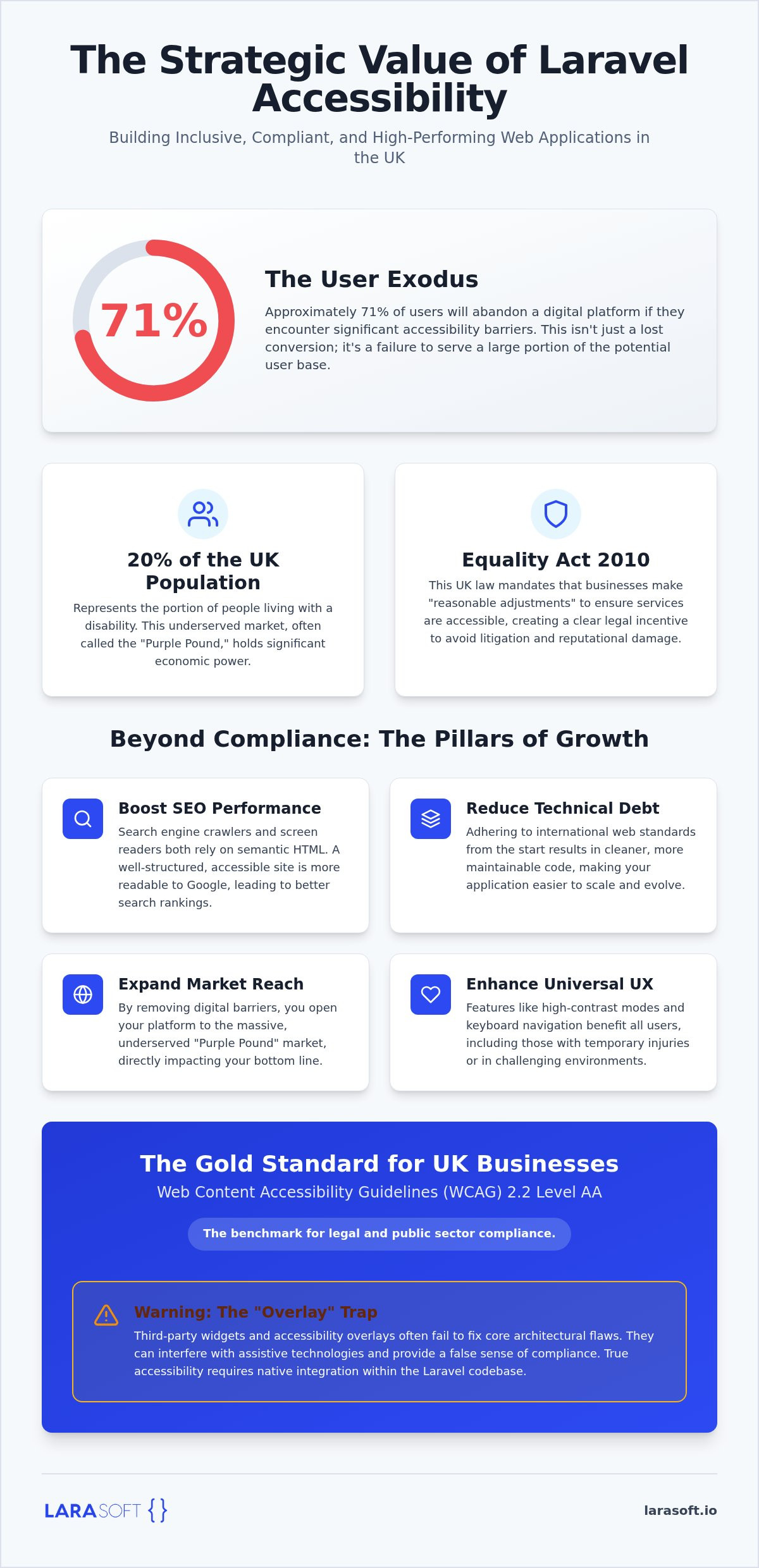
Approximately 71% of users will abandon a digital platform if they encounter significant accessibility barriers. For UK businesses operating in an increasingly regulated landscape, this isn't just a lost conversion; it's a substantial legal and reputational risk. Integrating laravel accessibility best practices into your development lifecycle is often perceived as a bottleneck that complicates dynamic Vue or React frontends. However, treating accessibility as an architectural foundation rather than a post-development patch is the only way to ensure long term scalability.
We recognise the challenge of maintaining velocity while meeting the rigorous WCAG 2.2 Level AA standards required by the Equality Act 2010. This article provides a definitive technical roadmap for implementing inclusive design within the Laravel ecosystem. You'll learn how to master semantic structure, manage complex state in SPAs, and leverage automated auditing to reduce technical debt. By the end of this guide, you'll have a clear strategy to reach the 20% of the UK population living with disabilities, ensuring your application is robust, compliant, and performant under pressure.
Laravel accessibility isn't a feature you toggle on; it's a fundamental approach to software architecture. It involves building inclusive web applications natively within the framework, ensuring that every user, regardless of their physical or cognitive abilities, can interact with your digital product. For those seeking a comprehensive overview of web accessibility, the core principles revolve around making content perceivable, operable, understandable, and robust. By integrating laravel accessibility best practices from the initial discovery phase, you transform accessibility from a perceived development hurdle into a foundational asset that drives long term growth.
The synergy between accessibility and SEO is often overlooked. Search engine crawlers and screen readers operate in remarkably similar ways; they both rely on semantic HTML to understand the hierarchy and context of a page. When we use bespoke Blade components to define clear headers, main content areas, and navigation landmarks, we're simultaneously improving your search engine rankings and assisting users with visual impairments. This structural integrity ensures that your application is as readable to Google as it is to a person using assistive technology.
Proactive accessibility is also a critical risk management strategy. In the UK, the Equality Act 2010 mandates that service providers make "reasonable adjustments" to ensure disabled people aren't disadvantaged. Failing to meet these standards invites "accessibility litigation" and significant brand damage. Adopting a "shift-left" approach, where accessibility is tested during development rather than audited at the end, protects your business from the financial and reputational costs of non-compliance.
Inclusivity directly impacts your bottom line. Approximately 20% of the UK population lives with a disability, a demographic often referred to as the "Purple Pound." By removing digital barriers, you're opening your platform to a massive, underserved market. Beyond this, accessible design improves the user experience for everyone. Features like high contrast modes, keyboard shortcuts, and clear form labels benefit users in situational constraints, such as those working in bright sunlight or individuals with temporary injuries. This universal design approach reduces technical debt by adhering to international web specifications, making your code easier to maintain and scale as your business evolves; for many companies, this technical robustness is paired with the bespoke branding expertise of Gravitas Web Design to ensure a truly credible online presence.
UK businesses should aim for Web Content Accessibility Guidelines (WCAG) 2.2 at Level AA. While Level A covers basic requirements, Level AA is the standard that most legal and public sector bodies require. It's a common misconception that "accessibility overlays" or third-party widgets can solve compliance issues. These tools often fail to address underlying architectural flaws and can even interfere with screen readers. True compliance requires a specialised technical intervention that addresses the root of the problem within the Laravel codebase itself. While public sector organisations have stricter reporting duties, private companies are increasingly held to the same functional standards to avoid discriminatory practices.
Laravel’s Blade templating engine is where structural integrity begins. Unlike third-party widgets that mask issues, native Blade development allows for precise control over the DOM. Implementing laravel accessibility best practices starts with defining clear boundaries for assistive technology within your templates. By building accessibility into your components, you ensure that every page follows a logical, predictable structure that supports all users.
Semantic HTML is the bedrock of accessible Laravel development. Proper heading hierarchy (H1-H6) isn't just about aesthetics; it provides a roadmap for screen reader users to skip to relevant content sections. We use specific landmarks to orient users and ensure they can navigate efficiently:
These landmarks help users skip repetitive elements and find information faster. Practical web accessibility development tips suggest that these structural cues are vital for users who navigate via keyboard or voice commands. We also recommend implementing "skip to content" links at the top of your Blade layout to allow keyboard users to bypass the main navigation entirely.
Forms are often the most complex interaction points in a web application. We ensure every input has a persistent, visible <label> rather than relying on placeholders that disappear once a user starts typing. When Laravel returns validation errors, we map these to UI alerts using aria-describedby to link the error message directly to the input field. This ensures the screen reader announces the specific error as soon as the field receives focus. For dynamic feedback, we implement ARIA live regions, ensuring that screen readers announce updates or success messages without requiring a page refresh.
Managing "Alt" text shouldn't be an afterthought. We integrate dynamic alt text fields directly into Laravel models and media libraries. This ensures that every image uploaded via the CMS has a meaningful description attached at the database level, preventing the common pitfall of empty or generic alt attributes. Standardising these UI patterns through reusable Blade components reduces technical debt and ensures compliance by default. If your current system lacks this level of structural integrity, our team can help with legacy code modernisation to bring your platform up to standard.
Dynamic frontends powered by Vue.js or React present unique challenges for inclusivity. While these frameworks enable high performance interfaces, they often fall into the "Single Page Application (SPA) Trap." Because the browser doesn't perform a full page reload during navigation, assistive technologies aren't automatically notified of content changes. Implementing laravel accessibility best practices in this context requires a deliberate strategy for state management and focus control. We use Inertia.js to bridge the gap between Laravel’s robust backend and modern reactive frontends, ensuring that the application state remains predictable for all users.
When a user navigates between routes in a Vue or React application, the focus often remains on the element that triggered the change. This leaves screen reader users stranded on a button that may no longer exist in the new view. We solve this by resetting focus to the top of the page or the primary H1 heading immediately after a transition. This provides an immediate anchor point for navigation.
Using "visually-hidden" route announcers is another effective technique. A small, hidden element with an aria-live attribute can announce the new page title to screen readers, providing the same context a sighted user gets from seeing the new layout. This approach is central to our Vue.js frontend development methodology. It ensures that fluid transitions don't come at the cost of inclusivity, making the journey as seamless for assistive technology as it is for any other user.
Custom components like modals, dropdowns, and tabs require careful ARIA implementation to be truly functional. The first rule of ARIA is to use native HTML elements whenever possible. If a button or details element can do the job, it's always the safer choice for structural integrity. However, for complex reactive components, ARIA attributes are necessary to communicate state changes effectively.
We focus on three key areas for reactive state in dynamic components:
Testing is the final, non-negotiable step in our workflow. Every custom interactive element is audited using only a keyboard. If a user cannot open a modal, navigate its contents, and close it using the Tab and Escape keys, the component is not production-ready. This level of meticulous execution ensures that your dynamic Laravel application remains robust and accessible for every UK user, regardless of their navigation method.
Integrating laravel accessibility best practices into your development lifecycle is only half the battle. To ensure your platform remains compliant and performant, you must establish a systematic verification process. We recommend embedding automated auditing tools like Axe-core directly into your Laravel CI/CD pipeline. This ensures that every pull request is automatically scanned for common violations before code is ever merged into production. However, reliance on automation alone is a strategic risk. Industry data suggests that automated tools typically identify only 30-40% of accessibility barriers, often missing nuanced issues like logical focus order or the contextual clarity of screen reader announcements.
We utilise Laravel Dusk to conduct browser-based accessibility tests that simulate real user interactions within your application. This allows us to programmatically check for contrast ratios, missing labels, and structural flaws across dynamic views. To bridge the gap left by automation, manual testing with screen readers such as NVDA or VoiceOver is essential. This manual process verifies the actual user journey, ensuring that complex navigation patterns remain intuitive and that the "SPA trap" mentioned earlier is successfully avoided. For organisations seeking the highest standard of inclusivity, real-user testing with individuals who have lived experience of disabilities remains the gold standard for validation.
Accessibility is a moving target that requires a proactive software maintenance plan. Without ongoing oversight, routine content updates and new feature releases can quickly introduce regressions that compromise your compliance status. We focus on training internal teams to enter content accessibly, ensuring that the structural integrity of the application remains intact as it evolves. Periodic audits should be a core component of your technical SEO strategy, as search engines increasingly prioritise platforms that provide a superior, barrier-free experience for all users.
For businesses undergoing legacy code modernisation, accessibility must be treated as a primary KPI rather than an optional add-on. It's often more cost-effective to rebuild components with accessibility in mind than to attempt to patch outdated, non-compliant codebases. Finally, every UK business should publish an Accessibility Statement. This document demonstrates transparency, outlines your commitment to WCAG 2.2 standards, and provides a clear channel for users to report any remaining barriers. If you're unsure where your current platform stands, our team can perform a comprehensive audit to identify and resolve critical gaps. Consult our experts for an accessibility audit to protect your brand and reach a wider audience.
At Larasoft, we view accessibility as a core pillar of structural integrity rather than an optional layer. We don't rely on generic widgets that offer a superficial sense of compliance while leaving underlying architectural flaws untouched. Instead, we integrate laravel accessibility best practices from the initial discovery phase through to final deployment. This "Accessibility-First" approach ensures that inclusivity is woven into the application's logic, state management, and user interface from the very first line of code.
Off-the-shelf CMS platforms and "quick-fix" overlays often impose hard limits on how much you can customise the underlying HTML. These restrictions make achieving 100% WCAG 2.2 Level AA compliance nearly impossible without significant, messy workarounds that increase technical debt. By choosing bespoke Laravel web applications, you gain granular control over every DOM element and ARIA attribute. This allows us to tailor the accessibility experience to your specific user personas and business goals, ensuring that your platform is truly inclusive rather than just technically compliant.
Our expertise in legacy code modernisation allows us to breathe new life into existing systems that have fallen behind modern standards. We don't just patch errors; we restructure components by applying laravel accessibility best practices to meet the rigorous demands of the UK regulatory landscape. This consultative approach ensures your digital assets are future-proofed against evolving requirements, such as the upcoming impacts of the European Accessibility Act (EAA), which will influence many UK businesses operating internationally.
We act as your deeply invested technical ally, providing the clarity and momentum needed to turn complex development requirements into a manageable journey toward growth. Building a perfectly performing system under pressure is what we find genuine satisfaction in. The next step in securing your platform's longevity is a comprehensive, accessibility-focused technical audit. This review identifies high-risk areas in your current codebase and provides a clear roadmap for remediation, ensuring your product reaches the widest possible UK audience while minimising legal exposure. A structured audit is the foundation of a more inclusive, scalable digital future.
Mastering laravel accessibility best practices is no longer a peripheral concern; it's a foundational requirement for any UK business seeking to mitigate risk and expand its market reach. By prioritising semantic Blade components and proactive focus management in dynamic frontends, you ensure that your platform remains robust and navigable for every user. This structural integrity doesn't just satisfy legal mandates like WCAG 2.2; it fundamentally improves your technical SEO and user retention across the board.
Since our founding in 2018, Larasoft has specialised in legacy code modernisation and the development of high-performance, inclusive digital products. We build for longevity. Our team acts as a dedicated technical ally, helping you transform complex compliance requirements into a manageable roadmap for growth. To protect your brand and ensure your assets are future-proofed, contact Larasoft today for a specialised Laravel accessibility audit. Building systems that perform perfectly for everyone is a challenge we find genuine satisfaction in solving.
Laravel is a backend framework and does not provide an inherently accessible frontend by default. While it offers robust tools like Blade for semantic templating and customisable validation handling, the responsibility for inclusivity rests entirely with the developer. Implementing laravel accessibility best practices requires a deliberate approach to HTML structure and ARIA attributes. It's a foundation that allows for perfect compliance, but it isn't a setting you can simply toggle on.
Accessibility and SEO share a symbiotic relationship rooted in semantic HTML. Search engine crawlers interpret your site's hierarchy much like a screen reader; they rely on clear headings and landmarks to understand context. Providing a barrier-free experience reduces bounce rates and increases dwell time, signals that search engines use to determine page quality. By building an accessible platform, you're creating a cleaner, more readable structure that search engines reward with higher visibility.
Private UK businesses are governed by the Equality Act 2010, which requires "reasonable adjustments" to ensure disabled people aren't disadvantaged. In practice, this means adhering to the Web Content Accessibility Guidelines (WCAG) 2.2 at Level AA. Public sector bodies have stricter mandates under the 2018 regulations. Failing to meet these standards exposes your business to litigation and reputational damage, making proactive compliance a critical part of your technical risk management strategy.
Accessibility widgets or overlays are generally insufficient for achieving true legal compliance. These tools act as a temporary layer that doesn't fix the underlying architectural flaws in your codebase. They often interfere with actual assistive technologies like screen readers, creating a secondary barrier for the users they are meant to help. Reliable compliance requires a bespoke development approach that addresses accessibility at the source code level within your components and templates.
Testing reactive applications requires a blend of automated and manual workflows. We recommend integrating Axe-core into your CI/CD pipeline and using Laravel Dusk for browser-based automation. Because Inertia and Livewire handle dynamic content changes without page reloads, you must manually verify focus management and route announcements using screen readers like NVDA or VoiceOver. Automated tools only catch a fraction of issues; manual audits are the only way to ensure a seamless experience.
WCAG 2.2 is the current operative standard, building upon 2.1 by adding nine new success criteria. These updates focus on improving the experience for users with cognitive or learning disabilities, low vision, and those using mobile devices. Key changes include stricter requirements for focus appearance and ensuring that interactive elements are easy to trigger. For developers, this means moving beyond basic contrast to consider more complex aspects of user interaction and navigation.
You should treat accessibility audits as a recurring part of your software maintenance cycle. We recommend a comprehensive audit at least once a year, with smaller, specialised reviews following any major feature releases or structural modernisation. Digital platforms are dynamic; routine content updates or frontend changes can inadvertently introduce new barriers. Regular auditing ensures that your application remains compliant and continues to reach the widest possible audience without accumulating significant technical debt.
Integrating accessibility from the start involves a marginal increase in initial development time, but it significantly reduces long-term costs. Fixing accessibility barriers after a product has launched is far more expensive than building them into the architecture from day one. By adopting laravel accessibility best practices early, you avoid the high costs of emergency remediation, legal challenges, and the technical debt associated with patching non-compliant legacy systems. It's an investment in scalability.
Here’s what we've been up to recently.
Certified Quality. Great Prices