Custom Survey Tool Development: A Business Buying Guide


The best survey tool for your business may not be custom-built. Ready-made platforms can work well when their workflows fit, but adapting distinctive processes to their limits can complicate integrations, reporting and data ownership. Custom survey tool development makes sense when the survey workflow creates strategic value, not simply because a bespoke option is available.
If you’re weighing build against buy, start with how your teams create, distribute and act on surveys. This guide will help you decide whether an existing platform is sufficient, define essential capabilities and integrations before development, and choose an approach that can accommodate future change. It also explains how to scope a bespoke Laravel application around your workflows without adding complexity for its own sake. Larasoft provides a staging server for client testing during development. Under the standard service agreement, code ownership fully transfers to you, and long-term support is available through service level agreements (SLAs).
Start with the buying decision: use a ready-made platform when your surveys follow familiar, repeatable patterns; assess custom development when distinctive workflows affect how your business operates. A bespoke tool isn’t automatically the better choice. It requires design and development work, which should be justified by a closer fit, stronger connections to existing systems or more control over how the product evolves.
Compare the approaches against your actual process, not a feature checklist alone. A ready-made platform may get standard surveys running with less setup. A custom application takes more upfront definition, but lets you shape respondent journeys, internal steps and integrations around your requirements.
| Criterion | Ready-made fit | Custom-build fit |
|---|---|---|
| Setup effort | Often lower for standard surveys | Requires scoping, design, development and testing |
| Workflow fit | Works well when existing processes match the platform | Can reflect specialised rules and journeys |
| Integrations | Suitable when available connections meet your needs | Can be designed around required applications and APIs |
| Data control | Governance depends on platform arrangements and configuration | Architecture can be shaped around business data requirements |
| Room for change | Changes depend on the platform’s options and roadmap | Future changes can be planned into the application’s design |
If your team collects straightforward feedback, uses common question types and reviews responses in basic reports, a ready-made platform may cover the job. This is especially true when the process is consistent: staff create a survey, share it with respondents, then review the results without complex approvals or follow-up actions. In that situation, adapting your process to a familiar tool may be simpler than commissioning software to reproduce standard functions.
Check the real workflow before deciding. Note who creates surveys, how responses are reviewed and what happens next. If the steps are repeatable and the platform’s integrations and data arrangements suit your needs, custom development may add complexity without solving a meaningful business problem.
Custom survey tool development becomes more relevant when a survey is part of a larger operational process. For example, a submission might need to pass through a particular approval sequence, show different questions to different respondent groups, or trigger business-specific handling after validation. If teams currently transfer information manually between the survey and internal applications, a tailored workflow could connect those steps through defined integrations.
Consider control over data as a practical design requirement, not an assumed benefit. Map where responses need to go, who uses them and how reporting should work. Then assess whether existing tools can support that journey without workarounds. Bespoke Laravel development can be scoped around these workflows and API connections, with future changes considered from the outset.
Choose custom development when distinctive workflows, essential integrations or planned changes justify building and maintaining an application around your business, not simply because bespoke software is possible.
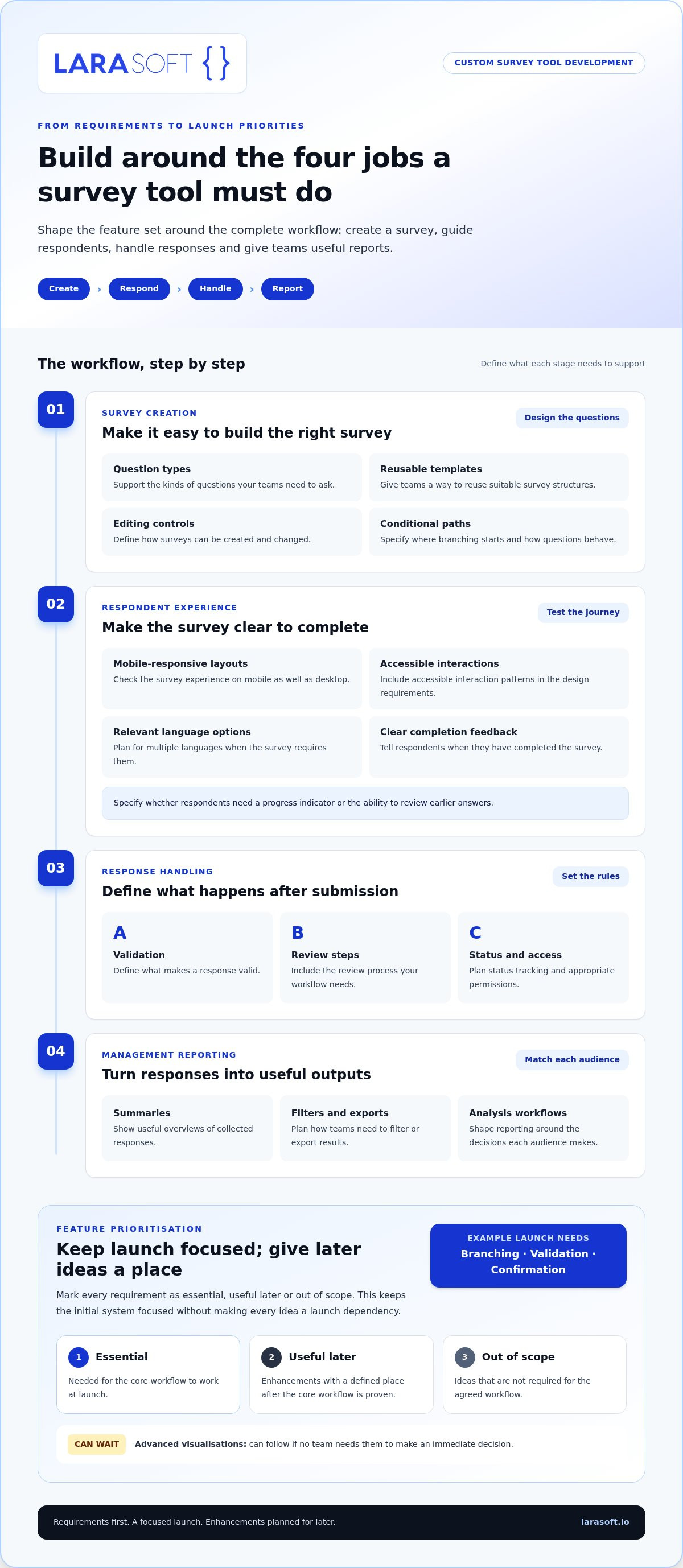
Build the feature set from verified requirements, not a checklist of fashionable functions. A survey tool should support the work people need to do, from creating questions to reviewing results and deciding what happens next. For custom survey tool development, group requirements into four areas: survey creation, respondent experience, response handling and management reporting. Then agree which capabilities are essential for launch and which can follow once the core workflow is proven.
A practical first-pass list might include:
Mark each requirement as essential, useful later or out of scope. For example, a launch version may need branching, validation and a clear confirmation screen, while advanced visualisations can wait if no team needs them to make an immediate decision. This keeps the initial system focused and gives future enhancements a defined place without making every idea a launch dependency.
Specify how questions behave, not just which question types are available. Define where conditional paths begin, what makes a response valid, and whether respondents need a progress indicator or the ability to review earlier answers. Test the journey on mobile as well as desktop. If surveys need multiple languages or accessible interaction patterns, include those requirements in the design from the outset rather than treating them as later polish.
Clear labels, sensible sequencing and immediate feedback can reduce uncertainty. If a response is incomplete, explain what needs attention; when a survey is submitted, confirm that it’s complete. A tailored interactive frontend, such as a Vue.js single-page application, may suit a respondent journey with dynamic steps. Its value depends on the requirements and overall architecture.
Before specifying dashboards, identify who creates surveys, who can view individual responses, who reviews submissions and who needs aggregated results. Translate those roles into permissions and review workflows. A team monitoring service feedback may need a concise trend summary, while analysts may need filtered exports for further work. These needs differ, so define the audience and decision behind every report.
Reporting becomes useful when each output answers a defined business question for a specific audience. That principle helps prevent a dashboard from becoming a display of metrics no one acts on.
Data safeguards also belong in the requirements: decide what information is collected, who can access it and how it should be handled. Document those decisions alongside retention, export and access needs so they can inform technical review and testing.
Once priorities are clear, Larasoft can shape bespoke Laravel development around the agreed survey workflow and reporting needs. Explore Larasoft’s software development work as a starting point for considering a tailored approach.
A survey tool’s architecture should reflect the journey each response takes through your business. Map that journey from submission through validation and storage to reporting or action in another system. This reveals whether a ready-made platform’s existing connections are sufficient or whether custom survey tool development could better support the full process.
Compare options by more than the number of integrations. Consider how deeply each connection needs to work, which system is the source of truth, who can access the data, and how easily the setup can change as workflows evolve. A simple export may meet a reporting need, while a process that updates internal records and routes responses for follow-up may require a more closely integrated application.
List every system that creates, receives or uses survey data. This might include a customer relationship management (CRM) system, an internal application, a reporting environment or a team workflow. For each exchange, document what starts it, which fields move, what validation applies and what should happen if the connection fails. These details turn “integrate with our CRM” into a requirement that can be designed and tested.
Laravel web development and REST API integration can support a bespoke architecture that connects survey workflows with existing applications. The right design depends on the systems involved, the data they expose and the behaviour required at each hand-off. Older systems may need additional consideration before they can exchange data reliably. Where relevant, legacy code modernisation can be part of the wider integration discussion.
Decide who needs access to individual responses, summary reports, survey configuration and administrative controls. A respondent-facing process, an analyst’s reporting view and an administrator’s configuration tasks may call for different permissions. Specify these roles and the actions each needs to perform so they can inform the application design.
Document requirements for data retention, export, correction and deletion, along with any internal governance processes that apply. These are inputs for technical assessment, not grounds to assume a particular security or compliance outcome. Review where data is stored, how it moves between systems and which teams are responsible for each stage.
Finally, identify likely changes: new response fields, additional destinations, revised approval steps or different reporting needs. An architecture that separates key workflows and integrations can make changes easier to scope, but flexibility still depends on clear boundaries and sound implementation. Record expected changes and their priorities before selecting an approach.
A clear brief turns custom survey tool development from a broad idea into decisions that can be designed, estimated and tested. Start with the business outcome, then document the people, rules, systems and reports involved. This gives your development partner a shared basis for agreeing what belongs in the first release and how you’ll judge whether it works.
Build the brief in sequence:
Keep respondent, administrator and reviewer journeys distinct. For each flow, note its starting point, decisions, possible exceptions and expected result. A respondent might submit an answer that requires validation, while a reviewer may need to return it for clarification. Turn these scenarios into acceptance criteria, such as confirming that invalid input receives a clear prompt or that a reviewer can see the correct status.
Make assumptions visible. If a rule or ownership decision is unresolved, record it as an open question rather than letting it become an unplanned development task. This makes the scope easier to discuss and refine.
Rank requirements by business necessity, respondent impact and dependency. A capability needed for the core survey journey or a required integration may be essential; an additional chart or optional workflow could be scheduled for a later phase. Record what is deferred and why, so future enhancements remain planned without becoming launch blockers. When evaluating a development partner, apply the same criteria to the proposed process, scope and testing approach. For wider partner-evaluation context, see this Laravel development agency selection guidance.
Once scope is agreed, Larasoft provides a staging server for client testing during development. Under the standard service agreement, code ownership fully transfers to the client, and long-term support is available through service level agreements (SLAs). To turn your requirements into a considered project scope, discuss your survey tool project with Larasoft.
Larasoft develops bespoke Laravel applications rather than selling ready-made survey software. Work starts with your project brief: its business outcome, respondent journeys, rules, integrations and reporting needs shape the proposed application. Once the project scope is received, the scope and project pricing are tailored to its requirements, giving both sides a defined basis for delivery.
This approach connects the technical design to the way your organisation needs to create surveys, handle responses and use the resulting data. It also helps distinguish essential functionality from enhancements that can be planned for later, rather than adding complexity without a clear purpose.
Larasoft’s Laravel web development and API integration expertise can be applied to requirements such as conditional workflows, connections to internal applications and business-specific response handling. The architecture is shaped around the agreed scope, including how information moves between the survey and connected systems. If a survey journey needs a tailored, highly interactive frontend, Vue.js single-page application development may also be relevant. Explore this Vue.js frontend development guidance for more context on frontend architecture.
Scoping is also an opportunity to resolve assumptions early. Clarify who uses each function, what a successful outcome looks like and which requirements belong in the first release. These decisions provide a practical reference for design and development, while leaving room to plan future changes without overbuilding the initial application.
Client testing is built into development: Larasoft provides a staging server where your team can review the application before it goes live. Testing against agreed workflows gives stakeholders a chance to assess how the tool behaves and raise issues during development.
Under the standard service agreement, code ownership fully transfers to the client. Long-term support is available through service level agreements (SLAs), providing a structured option for support after delivery. These arrangements clarify an important part of the buying decision: the application is a business asset that can be maintained beyond its initial build.
Larasoft’s credentials and experience include:
If your requirements point towards a bespoke application, bring your survey workflows, integration needs and priorities together into a project brief. Discuss your survey tool project requirements with Larasoft to explore a tailored delivery approach.
A survey tool should remain useful as your business changes. Before moving into delivery, decide how you’ll review its performance after launch: which outcomes matter, who will assess them and how new requirements will be prioritised. That gives your team a practical way to guide future improvements without losing sight of the original business purpose.
With custom survey tool development, a well-defined starting point can support a tool that fits today’s workflows and can evolve as those workflows develop. You don’t need every future feature mapped out now. Focus on the decisions and user needs that matter first, then set a considered path for what comes next.
Larasoft can translate your survey requirements into a bespoke Laravel project shaped around your business. Discuss your custom survey tool requirements with Larasoft to take the next step with a clear, practical plan.
Yes, anonymity can be designed into a survey workflow by avoiding direct identifiers and limiting which response data is collected. The requirements should distinguish anonymous submissions from confidential or pseudonymous ones, because those terms mean different things in practice. Define access, reporting and retention needs early, then make them part of the system design and testing criteria. For example, avoid collecting names or email addresses if they aren't needed for the stated purpose.
It may be possible when the source data can be accessed and mapped to the new structure. Start by documenting formats, question identifiers, response values and any required historical reporting. A migration plan should include validation and reconciliation so teams can identify missing or transformed records before relying on the new system. In custom survey tool development, preserve original survey and submission dates where they support year-on-year comparisons.
A bespoke system can be designed around the languages and respondent journeys the business needs. Plan translations for questions, instructions, validation messages and confirmation screens, not just the main survey text. Also define how language versions relate in reporting, so teams can compare responses consistently while preserving the respondent’s selected language. Keep each translation connected to a shared question structure, so updates can be tracked without confusing historical results.
Changes should be assessed against the agreed scope, dependencies and acceptance criteria before they are added. A clear change process helps stakeholders understand the effect on existing workflows and testing. Larasoft provides a staging server for client testing during development, giving clients a place to review the work and provide feedback as it progresses. A change log can record decisions, approvals and any acceptance tests affected by each revision.
Permissions can be specified around the responsibilities of respondents, administrators, reviewers and other user groups. Define which actions and data each role needs, including who can create surveys, view responses or manage reports. The design should reflect real operational duties, and permission behaviour should be included in testing rather than treated as a late-stage detail. For example, a reviewer might access assigned cases without changing survey-wide settings.
Begin with the decisions teams need to make from the collected responses. Then define suitable summaries, filters, exports or reporting views around those decisions and the users who need them. A clear requirements brief also distinguishes routine monitoring from deeper analysis, helping the development team prioritise useful outputs instead of building dashboards without a defined purpose. For example, managers may need completion trends, while analysts may need detailed exports for further work.
Here’s what we've been up to recently.
Certified Quality. Great Prices