Bespoke Mobile App Development UK: A Business Leader’s Guide


A mobile app can be well built and still fail if it forces your team to work around it. Effective bespoke mobile app development uk starts with your workflows, not a catalogue of features. First, define what the app needs to do, which existing systems it must connect with and how it should support the business as it grows.
It’s reasonable to want clarity before committing. Unclear priorities can expand scope, while integration choices and maintenance affect how useful the app remains after launch. Native and cross-platform development suit different needs, so the right approach depends on your users, technical requirements and longer-term goals.
This guide explains how to turn business needs into a focused product scope, assess the technical decisions behind an iOS or Android app, and understand the stages and responsibilities involved in delivery. You’ll also learn how API integration and planned software maintenance can support continuity beyond launch, helping you choose a development partner and treat your app as a lasting business asset.
Fragmented workflows, poor mobile access and services constrained by existing software can signal that a business needs a different approach. But a custom app isn’t automatically the answer. If a responsive website or an existing tool lets people complete a task reliably, another product could add cost and maintenance without solving a meaningful problem.
Bespoke mobile app development is the creation of software shaped around specific users, business processes and operational requirements. Unlike a generic product, a custom app can fit a particular workflow instead of asking teams to change how they work to fit the software. That flexibility comes with responsibility: the business needs to define the problem, make key decisions and plan for ongoing ownership. For a broader overview of custom software, consider how a tailored fit compares with the effort of building and maintaining it.
Look for a recurring task that is difficult to complete with the tools already available. Field teams, for example, may need to record job details on site. Paper forms and later data entry can lead to duplicated work. An app could guide staff through the required steps and connect the information they capture with business systems.
Customer self-service may be another practical use. If customers regularly need to check account details or submit a request, an app can provide a direct way to complete that task. Staff who need business-system access away from a desk may also benefit from a mobile interface designed around their role. If users mainly read information or submit occasional forms, a responsive website or web application from a digital agency like Nexient may be sufficient.
Start with four questions: who needs the app, what task should it improve, what business outcome should that support, and which systems must it work with? Then consider whether your organisation can maintain the app and its connections after release. These questions help establish whether bespoke mobile app development uk is a proportionate response to a defined problem, rather than a solution in search of one.
Before committing to a full scope, map the task with users and identify its most time-consuming or error-prone steps. Separate capabilities needed for launch from enhancements that can wait. For example, a first release might focus on submitting a complete service request, with additional account features considered later.
Choose measurable indicators before development begins. Task completion can show whether users can finish the core action. Processing time can help show whether the workflow is more efficient, while support demand can indicate whether the experience is clear. These measures give the team a practical basis for reviewing the app and prioritising improvements.
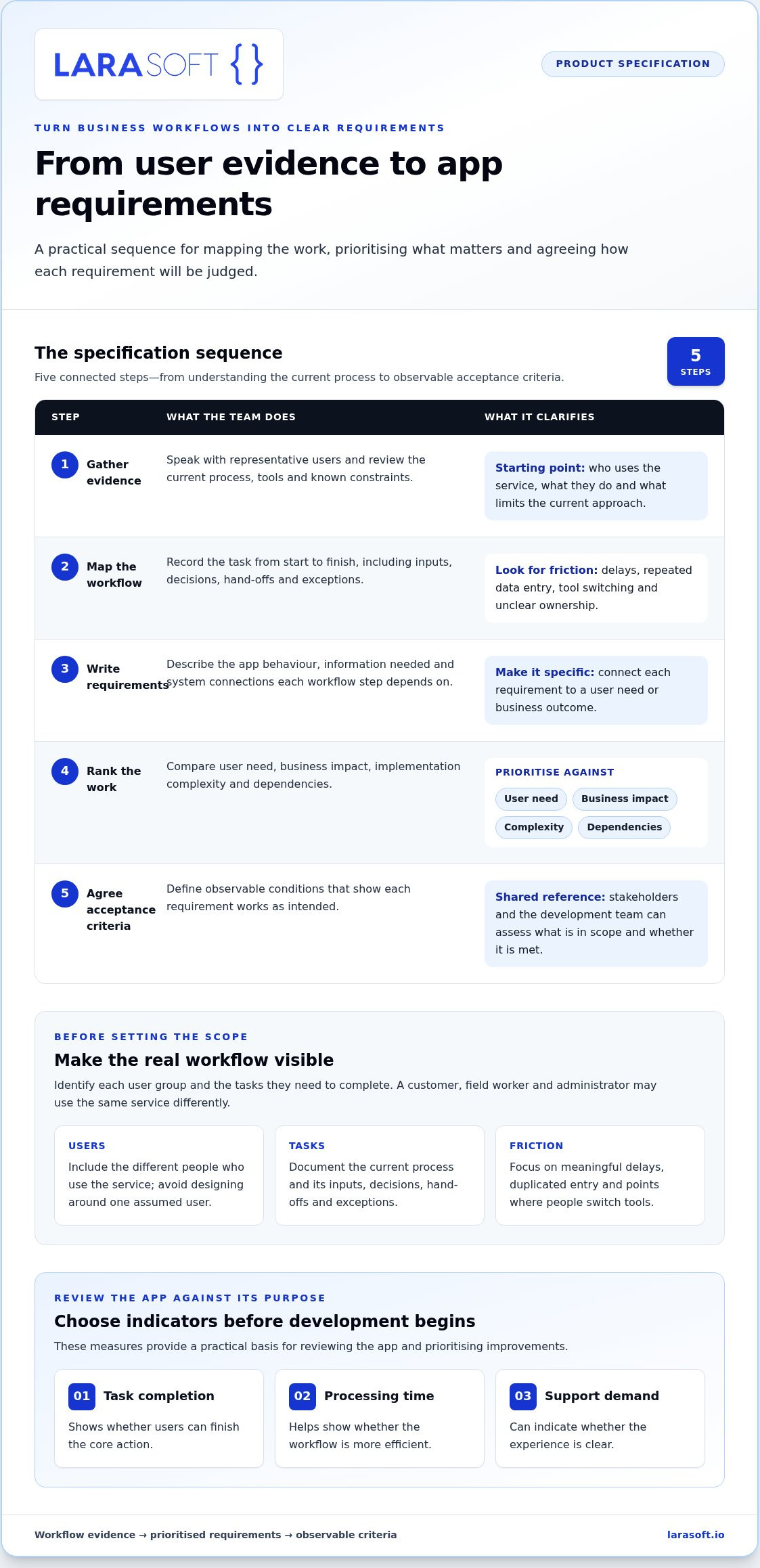
A useful specification translates how people work into clear product behaviour. It gives business stakeholders and the development team a shared reference for what the app must do, what can wait and how to judge whether a requirement has been met. For bespoke mobile app development uk, this clarity keeps product decisions connected to operational needs instead of letting the scope become a growing list of ideas.
Start by identifying each user group and the tasks they need to complete. A customer, field worker and administrator may use the same service in different ways, so avoid designing around a single assumed user. Document the current process, including hand-offs, delays, repeated data entry and points where people switch between tools.
A journey map or simple workflow diagram can make those steps visible. It might reveal that information is entered twice, an approval has no clear owner or a task depends on someone returning to a desk. These observations can become useful requirements. Focus on friction that matters to users and the business rather than digitising every existing step by default.
Turn the mapped workflow into a sequence of decisions. Each requirement should connect to a user need or business outcome, so stakeholders can assess its value and dependencies before it enters the launch scope.
User stories connect a real task to the app behaviour needed to complete it. For example: “As a field worker, I need to submit a completed job record from site so that the office can review it without re-entering the details.” Acceptance criteria could specify which information is required, what happens when a field is missing and how the user knows the submission has succeeded. This makes the requirement testable rather than subjective.
Separate launch-critical capabilities from enhancements. A feature belongs in the initial scope if the core task cannot be completed without it, a necessary system dependency requires it, or leaving it out would stop the product serving its intended purpose. Rank other ideas for later review. A clear scope reduces avoidable rework by resolving what the app must do before implementation makes changes more costly.
Set baseline measures before development, then choose indicators tied to the workflow, such as task completion, processing time or support demand. These measures help stakeholders evaluate whether the app improves the process and where further refinement may be needed. A structured specification can also help shape mobile app development with Larasoft around agreed requirements and priorities.
Architecture should follow the product’s actual demands, not a preference for a particular technology. For bespoke mobile app development uk, consider how people will use the app, what their devices need to do, which systems hold essential data and who will maintain the product over time. These factors shape both the mobile approach and the connections behind it.
The app is only one part of the system. A sound design accounts for how data moves between the user interface, backend services and existing business software. It also defines what should happen when a connection is slow or a service is unavailable.
Native apps are built specifically for iOS or Android. Cross-platform apps share substantial implementation across platforms. Neither approach suits every product. The decision depends on the experience users need, the device capabilities the app relies on, the skills available to support it and the future effort required to maintain it.
An app built around demanding platform-specific features may have different priorities from one focused on consistent forms and account access across both operating systems. Consider expected performance, interface behaviour and how closely the app needs to use device features. Also account for how updates will be developed and tested as the product evolves. Compare platform options once these requirements are clear, rather than choosing a technology first and shaping the product around it.
List every system the app must communicate with. For each one, record what information the app needs to read or send, which process uses it and when it must be available. An API provides a controlled way for the app to exchange data with other software. For instance, a mobile app might submit a new request to a backend, which then passes relevant information into an existing business process.
A connected backend can manage application logic and coordinate data exchange. Larasoft’s Laravel development capabilities can support custom backend applications alongside mobile products. Define clear boundaries: identify which system owns each record, what happens when data changes and how errors are handled. If an older system limits reliable access or constrains the planned workflow, assess its role early. Legacy code modernisation may form part of the wider technical plan.
Making these decisions during architecture planning helps keep the app aligned with business processes and gives development, testing and maintenance a shared technical foundation.
A structured process makes responsibilities and decisions visible from the outset. For bespoke mobile app development uk, each stage should produce something the next stage can use, from an agreed product direction to tested software and a maintenance plan. Regular reviews help stakeholders spot usability concerns, clarify scope and address assumptions before they become harder to change.
Discovery aligns the business objective, intended users, operational constraints and measures of success. Business stakeholders explain priorities and existing processes, while users help reveal how tasks work in practice. The output is a shared understanding of the product’s purpose, boundaries and key requirements, giving the team a sound basis for design and technical planning.
Design turns that direction into user journeys and interface decisions. Prototypes let stakeholders review how someone moves through a task before the full product is implemented. Test them against real scenarios, including errors and incomplete information, rather than approving screens on appearance alone. If the app also needs a connected web experience, Vue.js frontend development can support a complementary interface.
During implementation, the team builds the agreed capabilities in stages. At each review, stakeholders can see working software, compare it with requirements and raise issues while changes are manageable. The team can then update decisions, priorities and outstanding work. This keeps scope and expectations visible instead of saving feedback for the end.
Testing checks that the app behaves as specified across supported devices and user journeys. It should cover functionality, usability, integrations and security requirements, including the effects of interrupted connections or invalid information where these apply. Product stakeholders confirm that workflows meet business needs, while technical reviewers assess the integrated system. Test results and recorded defects provide a clear basis for release decisions.
Release preparation brings together the approved build, deployment steps, operational ownership and a way to monitor the app after it becomes available. Decide who reviews issues, how defects are prioritised and how updates are delivered. Launch is a transition into live use, not the end of product responsibility.
Maintenance supports security, compatibility and planned product changes as software and business needs evolve. Agree how issues will be recorded, assessed and addressed, and who owns decisions about updates. Ongoing software maintenance can help preserve continuity between releases and keep the app aligned with connected systems.
For a delivery process grounded in your product requirements, discuss your mobile app development project with Larasoft.
A mobile app needs to fit the business it serves and the systems it relies on. Larasoft develops native and cross-platform iOS and Android applications, shaping the approach around each project’s users, workflows and technical requirements. For businesses considering bespoke mobile app development uk, this means planning for the product as part of a wider software environment, not as an isolated interface.
Mobile products often depend on APIs, backend applications and dependable data flows. An app may need to retrieve information, submit updates or connect a user action to an existing business process. Planning those connections alongside the mobile experience helps align what users see with how information is handled behind the scenes.
The right supporting technology depends on the architecture. Where a project needs a custom backend, Laravel development can support application logic and system connections. Vue.js and React frontend capabilities may suit related web interfaces that need to work alongside the mobile product. These technologies aren’t defaults; they’re options to consider when they fit the project’s requirements.
Technical planning should extend beyond the first release. As operating systems, connected services and business priorities change, the app may need updates to preserve compatibility and support new requirements. Larasoft’s API integration and software maintenance services can form part of that longer-term plan, helping teams consider system continuity alongside initial delivery.
A useful first conversation starts with the business problem, not a long feature wish list. Bring a clear picture of who needs the app, what they’re trying to do and what outcome the business wants to support. For example, describe a task that currently involves repeated data entry or a customer process that depends on staff intervention.
It also helps to outline the systems the app may need to connect with, known technical or operational constraints, and the capabilities that must be in place for launch. Distinguish these essentials from ideas that could follow later. This gives the discussion a practical frame for exploring user needs, platform options, integrations and ongoing maintenance.
With those points in view, Larasoft can discuss how native or cross-platform development, backend and frontend components, API integration and maintenance relate to your requirements. The aim is to connect business priorities with a technical approach that can support the product beyond launch.
Discuss a bespoke mobile app with Larasoft and outline your users, business objective, existing systems and priorities.
A mobile product creates lasting value when it can respond to what its users need next. Treat the first release as the start of a considered product journey: observe how people use it, review the outcomes that matter to the business and use those findings to guide future improvements. This keeps decisions grounded in real experience and helps prevent a useful app from becoming a static tool.
For leaders exploring bespoke mobile app development uk, the next step is to turn the strongest opportunity into a focused plan. Bring one important workflow, the people it affects and the change you want to achieve. From there, you can define a practical starting point and a roadmap that accounts for technical foundations and ongoing ownership.
Larasoft can help connect mobile product decisions with wider business systems and objectives. Shape your app roadmap with Larasoft and take a considered first step towards a product that can evolve with your business.
With a clear purpose and a capable technical partner, you can move forward with confidence.
Bespoke mobile app development is the design and creation of an app around a business’s particular users, workflows and requirements. Unlike a fixed product template, the app’s functions and technical approach are defined for its intended use. A useful scope also identifies what the app won’t handle at launch. This boundary helps teams avoid adding features simply because they’re possible, while leaving room to plan future updates and maintenance.
There’s no standard price for bespoke mobile app development UK projects because the work depends on scope, platforms, design, integrations, security requirements and support needs. Start by identifying the essential user journeys and what must be ready for launch. Then assess dependencies, such as existing systems or complex permissions. Larasoft tailors development to each project, so an estimate should reflect its specific requirements rather than a generic price range.
Development time depends on product scope, platform decisions, integrations, stakeholder availability, testing and release requirements. A project with clear decisions and accessible system documentation may follow a different plan from one where requirements or dependencies are still being resolved. Discovery and prioritisation help establish a project-specific schedule before implementation begins. Treat any generic estimate as an early reference, not a delivery commitment; milestones should reflect the actual work and review process.
Neither approach suits every product. Native development builds specifically for iOS or Android, while cross-platform development shares substantial implementation across platforms. The choice depends on user expectations, device capabilities, performance needs, platform requirements and how the app will be maintained. Start by listing the features users need and any device-specific requirements, then assess which approach fits those priorities. A focused technical comparison can help clarify the trade-offs.
Yes, an app can connect with existing systems through APIs when those systems provide suitable integration pathways. Map the information the app needs to exchange, which system owns each record and who should be allowed to access it. For example, a submitted mobile form may need to create or update a record in another application. Reviewing available interfaces and system constraints during discovery helps the team plan integration as part of the architecture.
After launch, the app needs ongoing operational ownership. Teams may review performance, investigate reported defects, address security or compatibility issues, and use feedback to prioritise improvements. A maintenance plan should name who assesses issues, how changes are approved and how updates are prepared for release. Larasoft provides software maintenance for custom software, supporting continued attention to the product as its technical environment and business needs change.
A project can target iOS, Android or both. The initial scope should reflect the intended users and product requirements. Native development uses platform-specific applications, while a cross-platform approach can share substantial implementation between operating systems. Consider where your users need access, whether particular device capabilities matter and how each option affects future updates. Defining these priorities early helps set a clear platform scope and gives the team a basis for planning later expansion.
Here’s what we've been up to recently.
Certified Quality. Great Prices