Progressive web app development in the UK: costs and savings


A mobile app doesn’t always need an app-store download to reach users. For UK businesses, progressive web app development in the UK can create a website that works across devices, is discoverable through search and shareable by link, and can be added to a phone’s Home Screen. On iPhone, push notifications are available after the user adds the app and gives permission.
That flexibility makes progressive web apps a practical option for businesses weighing a mobile experience against the cost and effort of building separate native apps. They can support selected offline tasks and receive updates when deployed, while features that rely on fresh server data still need an internet connection.
This guide explains what a PWA can do, how installation and notifications work on iPhone, and which design, integration and functionality decisions shape development costs. You’ll also see where progressive web app development in the UK can reduce duplicated work, and when a native or cross-platform app may be a better fit.
Yes. Progressive Web Apps can send push notifications, and service workers can support selected offline workflows by caching screens, files and recent data.
UK businesses can assess performance, SEO and return on investment by tracking mobile search impressions and clicks, page speed, task completion, conversions and ongoing development costs. For ecommerce brands aiming to optimise speed and user retention, insights from britecode.io demonstrate how conversion-focused design directly influences sales. Compare those results with the business outcomes the PWA is meant to support, such as completed bookings or fewer abandoned forms.
A service worker can store selected app screens, files and recent data, so users can reopen them when a journey or weak signal interrupts connectivity. Decide which tasks must remain available offline, such as drafting an order, viewing a saved itinerary or filling in a form. Define clear boundaries for the data each workflow can use.
For queued actions, the app can save a user’s change locally instead of treating a failed connection as a completed server update. When the device reconnects, it can send queued changes to the server and refresh its data. Make it clear whether an action is saved locally, waiting to sync or confirmed by the server.
For example, a customer might prepare a basket offline, then submit it after reconnecting. A payment or stock check that needs fresh server data must wait for a connection.
Push notifications and offline browsing solve different problems. A cached screen can remain available without a connection, while a new push notification needs a delivery route to the device. A notification may bring a user back to the PWA, but it cannot make unavailable server data current.
Use notifications for useful events, such as an order update, and design the linked screen to work with weak connectivity. If the app opens offline, it can show cached content and explain which details need a connection. This avoids presenting old information as a live update.
When a device reconnects, the PWA can refresh its data and synchronise queued changes. Treat the notification as a prompt to revisit the app, then let the app retrieve the latest status from the server. This distinction keeps offline browsing useful without confusing cached information with confirmed updates.
For UK businesses, progressive web app development in the UK is priced according to scope and quoted after a request. Key cost factors include design, integrations, offline workflows and testing. Compared with responsive websites, PWAs add app-like capabilities; compared with native apps, they can share one web codebase but may have less access to some device features.
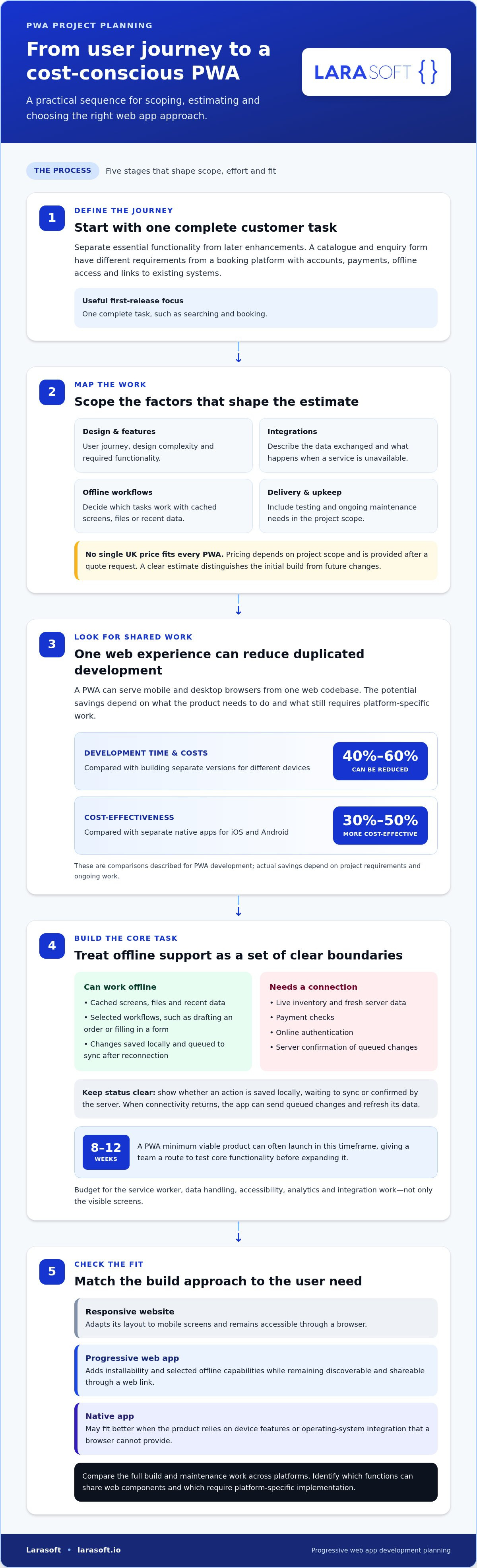
Start by defining the user journey, then separate essential functionality from later enhancements. A catalogue and enquiry form have different requirements from a booking platform with accounts, payments, offline access and links to existing systems. Each integration adds design, implementation and testing work, so a project brief should describe the data exchanged and what happens when a service is unavailable.
There’s no single UK development price that fits every PWA. The price depends on the project and is provided after a quote request, based on factors such as feature scope, design complexity, integrations, testing and ongoing maintenance needs. A clear estimate should distinguish the initial build from future changes, so teams can compare the full project scope rather than one headline figure.
PWAs can reduce duplicated work when one experience serves mobile and desktop browsers. PWA development and updates can reduce development time and costs by 40% to 60% compared with building separate versions for different devices. PWAs are generally 30% to 50% more cost-effective than separate native apps for iOS and Android.
Those savings depend on what the product needs to do. A PWA minimum viable product can often launch in 8 to 12 weeks, giving a team a route to test core functionality before expanding it. Budget for the service worker, data handling, accessibility, analytics and integration work, not just the visible screen. A smaller first release can focus on one complete customer task, such as searching and booking.
A responsive website adapts its layout to mobile screens and remains accessible through a browser. For small businesses that do not yet require complex app capabilities, web design specialists such as Mosster Services Limited build responsive websites that establish an effective online foundation. A PWA adds installability and selected offline capabilities, while remaining discoverable and shareable through a web link. A native app can access a wider range of device features, which may matter for products built around hardware or operating-system integration.
Compare approaches against user needs, not a feature checklist alone. If customers need to browse, read content or complete standard transactions, a PWA may cover the core journey with one web experience. If a product relies on device capabilities a browser cannot provide, native development may fit better. Include distribution, maintenance and updates in the decision.
To assess likely savings, map each required feature to its build and ongoing maintenance work across platforms. Then identify which functions can share web components and which require platform-specific implementation. This gives progressive web app development in the UK a practical basis for estimating delivery effort, rather than assuming the PWA label itself reduces costs.
Installation, push notifications and device APIs shape how an installed PWA feels on mobile. Support differs across browsers and operating systems, so map each feature to the devices your audience uses.
People can install a PWA by visiting its website and adding it to their device’s Home Screen. On iOS, there’s no automatic installation prompt; users open Safari’s Share menu and choose the Home Screen option. A PWA can be configured to suggest installation after 3 visits, giving users time to understand its value before adding it.
Android devices also support PWA installation. A web app manifest provides the app’s name, icon, colours and app-style display, helping the installed version feel distinct from an ordinary browser tab. Plan and test the installation journey on both platforms, including how the app icon appears and what happens when someone opens it.
Device APIs need separate consideration. Web Bluetooth, Web NFC and some sensor features aren’t supported in iOS PWAs. If a mobile application depends on connecting to Bluetooth equipment or reading NFC tags, that limitation can change the technical approach. Test each required device capability on the actual browser and operating-system combination it must support.
Also define how app versions reach users. PWA updates can go live as soon as they’re deployed, without an app-store review. This simplifies distribution, but teams should test updates against existing users’ saved data and active sessions.
Safari supports push notifications for PWAs on iPhone and iPad since iOS 16.4. On iPhone, users must first add the PWA to the Home Screen, then allow notifications. Build this permission sequence into the user journey rather than assuming a website visit alone enables alerts.
Use notifications for specific, useful events, such as an abandoned-basket reminder or an order status change. A fashion retailer’s conversion rate on push notifications about abandoned baskets was 18%. JD.ID improved its mobile conversion rate by 53% using caching strategies, installation and push notifications.
These examples show how installation and notifications can support engagement, but each feature should match the product’s purpose. Give users a clear reason to opt in, and connect each alert to a relevant screen. For example, an order update should open the order details, not a generic home page.
Before release, test the complete path on iPhone and Android: installation, permission, delivery and the destination screen. Keep notification behaviour distinct from native apps, because PWA capabilities vary by browser, operating system and device. A feature that works on one combination may not behave identically across every user’s device.
Yes, PWAs work on iPhone through Safari, with support shaped by iOS features and browser behaviour. For UK projects, use HTTPS, target WCAG 2.1 AA accessibility, define privacy controls, then plan, design, build, test and launch the experience.
Four components shape an iPhone PWA: HTTPS, a web app manifest, a service worker and responsive design. HTTPS provides a secure connection; the manifest defines the app’s name, icon, colours and app-style display. The service worker manages cached files and selected offline content. Together, they help Safari present a website as an installable, app-like experience.
Responsive design adapts layouts to different screen sizes, including iPhone displays. Test practical tasks such as navigating menus, reading product details and completing a checkout on a small screen. Also test landscape and portrait layouts, text enlargement and touch controls. Saved PWA data on iOS may be cleared when the device is short of space, so don’t treat local storage as the only copy of important information.
HTTPS is a core security measure, but it doesn’t replace careful data handling. Decide what personal information each screen needs, restrict access to relevant functions, and avoid storing sensitive details unnecessarily. For accessibility, check keyboard operation, visible focus, readable contrast and descriptive labels against the WCAG 2.1 AA target.
A responsive PWA should keep its main tasks clear across devices, rather than simply shrinking a desktop page. For example, an events service can prioritise finding an event, checking its details and booking from an iPhone. Consistent navigation, readable text and touch-friendly controls help users complete each step without relying on desktop interactions.
Plan the experience around the user journey before development starts. Identify the key task, sketch its screens, define the data each screen needs, then build and test those flows on target devices. A service worker can support selected cached screens, while the manifest defines the installed app’s presentation. Test the launch version with real content and common user paths, not just empty demonstration screens.
After launch, review how users move through key tasks and where they leave. Compare mobile conversion journeys with the intended flow, then prioritise fixes based on observed friction. This makes PWA development iterative, with each release improving the experience across supported browsers and devices.
A bespoke PWA starts with a business workflow, not a generic app template. That matters when a UK organisation needs its own booking rules, customer accounts, stock data or links to existing systems. The technical design should fit those requirements while keeping the experience accessible through mobile browsers and installable on supported devices.
UK agencies and developers specialising in progressive web apps build web experiences around these requirements. Their work can span interface design, backend services, integrations, offline behaviour and deployment. For example, a delivery business might need drivers to record proof of delivery during poor connectivity, then synchronise that information once the device reconnects. The workflow and data rules shape the architecture.
Start by mapping the user journey and identifying where it depends on live information. Separate tasks that can use cached content from those that require a current server response, such as checking availability. Then define what happens when a user’s action cannot be sent immediately. Clear states for pending, completed and failed actions help prevent duplicate bookings or orders.
Next, design the PWA around the systems it must work with. A service might need to connect customer records, inventory or payment processing through APIs. Each integration brings its own data structures and failure scenarios. Before development, document what information moves between systems, which system owns each record, and how errors appear to users.
Choose a web architecture that supports the interface and business logic. A Laravel backend can provide application logic and API connections, while Vue.js or React can support a custom frontend. The right structure depends on existing software, product workflows and the team responsible for future changes. Avoid adding features without a clear user or operational purpose.
Progressive web apps can be discovered through search, shared by link and updated without an app-store review. A PWA can often be packaged for a Google Play listing, while an App Store listing usually needs a native or cross-platform build. This distinction should guide distribution planning, especially if reaching iPhone users through the App Store is essential.
Keep the first release focused on a complete, valuable workflow, then use observed user behaviour to guide updates. Discuss your bespoke application requirements when you’re ready to turn a defined workflow into a scalable web product.
Larasoft provides Laravel Web Development for businesses planning bespoke web applications with tailored workflows, integrations or backend logic. Its Vue.js and React frontend development can support interfaces designed around those requirements, while Native Mobile App Development is relevant when users need native capabilities or app-store distribution.
Turn to Larasoft when your project needs a custom application architecture rather than a standard website, or when you’re weighing a web-based experience against a native app. A clear outline of user tasks, system integrations and essential features helps shape the right technical direction.
To discuss your application requirements and explore a suitable development approach, contact Larasoft or visit larasoft.io.
Before committing to a build, define the customer task your product should make easier. Set out the journey from first visit to completion, identify the systems and data it depends on, and decide how you’ll judge whether the experience works for users and the business. This gives your progressive web app development in the UK a clear direction, grounded in product priorities rather than technology alone.
Larasoft can support that work through Laravel Web Development, with Vue.js Frontend Development or React Frontend Development for a tailored interface. The right combination depends on your application’s architecture, user journeys and integration needs. A focused scope also gives your team a practical foundation for future changes without losing sight of the original product goals.
Bring your requirements and priorities into a conversation with the team. Contact Larasoft about your PWA and take the next step towards a considered, purpose-built experience.
Yes, businesses use PWAs to deliver app-like experiences through the web. Starbucks saw a 2x increase in daily active users after implementing its PWA, illustrating how the format can support customer engagement. That result doesn’t establish how widely PWAs are used across the UK, but it shows why organisations consider them: users can reach an experience through a web address without starting in an app store.
PWA development is the work of building or adapting a website to provide app-like capabilities through compatible browsers. It includes shaping the user experience, setting up installation and offline behaviour, and connecting the interface to required business systems. For example, a membership service might need account pages, searchable content and a clear route to renew. The design and technical scope depend on the intended users and tasks.
Yes, a PWA can be installed on compatible phones. Users can add it from the browser to their device’s Home Screen, then open it using its icon. This gives returning customers a direct route to a service, such as a travel account or event booking, without searching browser bookmarks. Installation behaviour and available features differ between operating systems and browsers.
Yes, a PWA can support selected tasks offline if its design makes the necessary content available locally. For instance, a field worker could consult previously loaded guidance outside network coverage. The experience should clearly distinguish saved information from actions that still need server confirmation. Tasks requiring a current account check or live availability depend on connectivity, so plan their offline states before launch.
A PWA can often be packaged for a Google Play listing, but an App Store listing usually requires a native or cross-platform build. The right route depends on where users expect to find the application and whether store distribution is essential. Treat the PWA and any store-distributed version as distinct delivery decisions, then plan how users will receive consistent functionality and updates through each route.
Yes, an existing website can be adapted into a PWA, provided its architecture supports the required experience. Begin with an audit of the current pages, navigation, data flows and mobile layouts. Then identify what needs to change for installation, offline use or app-style presentation. A content-led site may need limited structural changes, while a complex account portal could require more substantial frontend and backend work.
PWA development cost depends on project scope and is provided after a quote request. Key factors include the existing website, custom interface work, integrations, offline workflows, testing across devices and ongoing maintenance requirements. A useful brief describes the users, essential tasks and systems involved. That lets the project scope focus on the functionality the product needs, rather than adding features without a clear purpose.
No, a PWA won’t provide identical support on every device. Compatibility and capabilities vary by browser, operating system and hardware. For example, some web features available on Android may not work in an iPhone PWA. Define the devices your audience uses, then test key journeys on those combinations. This helps identify where an alternative interaction or a separate native application is needed.
Here’s what we've been up to recently.
Certified Quality. Great Prices