How to Integrate Laravel: A Practical Guide for 2026

A Laravel integration that works in a demo can still fail when real workflows, changing data and network interruptions put it under pressure. If you’re exploring laravel integreren, the first decision isn’t which package to install. It’s where the integration should begin and end, and how it should respond when something goes wrong.
Choosing between an API, a package, a webhook or an asynchronous workflow can feel uncertain. A quick connection may create security or reliability problems later if it doesn’t account for the systems, data and timing involved. Start by defining the workflow, set clear boundaries, and plan for failure. This guide explains how to choose an integration pattern, build a secure and testable connection, and maintain it as requirements evolve. It also covers practical decisions around Laravel architecture, performance and long-term stability.
Laravel integration is the deliberate connection of a Laravel application with external services, other systems or internal components so they can exchange data or coordinate work. Installing a package may add functionality to your codebase, but it isn’t automatically an integration. An integration defines how components communicate, what information moves between them and what happens when that exchange fails.
Start with the business outcome, not the technology. You might want to reduce manual data entry, keep customer records aligned across platforms or enable a feature that relies on an external service. Laravel provides a foundation for organising application logic and connections. The Laravel framework overview offers useful background on its architecture. Shape the integration itself around your product and workflows.
Data may move in one direction, such as sending a completed order from Laravel to an internal reporting system. A two-way connection is more complex: both systems may send updates, so you need to define which system owns each field, how conflicting changes are resolved and which side acts on them. Set these boundaries early to keep the connection predictable as the application grows.
Common connections include payment providers, customer relationship management (CRM) systems, identity services and internal platforms such as stock or reporting tools. Choose integrations based on the workflow, where each piece of data is authoritative and which interfaces the systems provide. One product may need a one-way update from an internal platform, while another needs continuous data exchange. There’s no standard integration stack for every Laravel project.
Write down the event that starts the workflow, the source of truth, the data required and the direction it needs to travel. Then establish when the transfer must happen: immediately, on a schedule, after a user action or in response to an event. These details help determine the connection’s design before implementation begins.
Decide what the application should do if a system is unavailable or returns incomplete data. Should it retry, record the failure for review or let the user continue with a clear status? Define the required credentials and permissions, who owns the connection, and how changes to either system will be handled. This groundwork gives laravel integreren a clear scope and makes technical decisions easier to test and maintain.
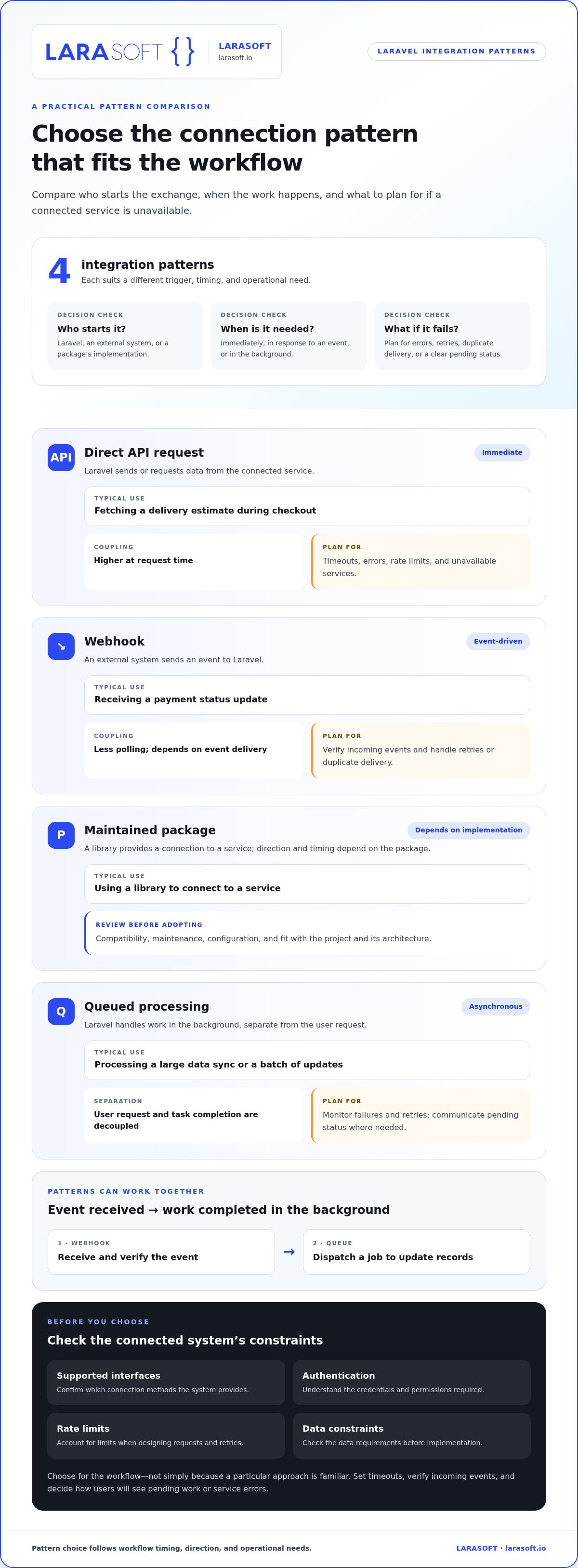
The best pattern depends on who starts the exchange, how quickly the result is needed and what should happen if a connected system is unavailable. Before choosing, review the system’s supported interfaces, authentication requirements, rate limits and data constraints. When researching “laravel integreren”, choose for the workflow, not simply because a particular approach is familiar.
| Pattern | Direction | Timing | Coupling | Typical use | Operational considerations |
|---|---|---|---|---|---|
| Direct API request | Laravel sends or requests data | Immediate | Higher at request time | Fetching a delivery estimate during checkout | Set timeouts and handle errors, rate limits and unavailable services. |
| Webhook | External system sends an event to Laravel | Event-driven | Lower polling, but dependent on event delivery | Receiving a payment status update | Verify incoming events and plan for retries or duplicate delivery. |
| Maintained package | Depends on the service and package | Depends on its implementation | Can add dependency on package design | Using a library to connect to a service | Review compatibility, maintenance, configuration and project fit. |
| Queued processing | Laravel handles work in the background | Asynchronous | Separates user request from task completion | Processing a large data sync or sending a batch of updates | Monitor failures and retries; communicate pending status where needed. |
Use a synchronous API request when the user or business process needs the answer before it can continue, such as checking whether a reference is valid. Set a timeout and handle unsuccessful responses deliberately. Account for rate limits, and decide what the interface should show if the service is temporarily unavailable. If the third party may take time to respond, avoid making the user wait for work that can happen separately.
Webhooks suit updates initiated by another system, but verify each incoming event before acting on it. Queues are useful when processing can happen after the request or when controlled retries are needed. These patterns can work together: a webhook can confirm an event, then dispatch a queued job to update records. For security decisions across the connection, the OWASP Laravel security guidance is a useful reference.
A package can reduce repetitive implementation, but assess whether it is actively maintained, compatible with your Laravel version, configurable enough for the workflow and a good fit for your application architecture. Where the workflow is specific to your product, a tailored connection may offer clearer control. Larasoft provides Laravel API integration shaped around your application and its future changes.
A reliable integration moves from a defined business requirement to a documented, tested release, with clear error handling at each stage. For a project focused on “laravel integreren”, follow this sequence: define the outcome, review the interface, set the application boundary, build the smallest useful flow, test failure cases, then release with monitoring and a recovery plan.
Good structure keeps this process manageable as the application evolves. These Laravel development best practices cover maintainable structure, API design and security. Apply the principles that fit your project. The aim isn’t to add layers for their own sake, but to make the connection’s responsibilities visible, testable and straightforward to maintain.
An integration is easier to maintain after launch when failure handling and ownership are designed in from the start. A payment status update, for example, shouldn’t silently disappear if a connected service is unavailable. Define who responds to failures, how the application recovers and which operational signals indicate that the connection needs attention.
Use credentials with only the permissions the integration requires, and keep secrets out of source code, error messages and logs. Validate external data against expected formats and rules before using it. For incoming webhooks, verify authenticity before processing the event, then reject malformed or untrusted requests.
Exchange only the information the workflow needs. Set appropriate retention practices for payloads and related records, particularly when they contain sensitive data. These controls help keep the integration’s security boundary clear as it handles real business information.
External services can time out, reject requests or return unexpected responses. Set timeouts so application requests don’t wait indefinitely, and define retry limits for temporary failures. Retrying every failure without a limit can prolong disruption or overload a dependency, so distinguish errors that may resolve from those that need investigation.
Retries can also deliver the same event more than once. Use an idempotency strategy, such as recording a provider’s event identifier, so repeated delivery doesn’t trigger duplicate updates or actions. Log useful context, including a correlation identifier where appropriate, but exclude tokens, passwords and sensitive payload values. Alert on meaningful conditions, such as repeated job failures or a prolonged gap in expected updates, rather than generating noise for every transient issue.
Assign an owner to review integration health, dependency changes and failed events as part of ongoing software maintenance. If a connection sits inside older application code, legacy code modernisation can help create clearer boundaries for ongoing changes. Treating laravel integreren as an ongoing responsibility makes launch the start of operational care, not the end of the work.
Larasoft’s Laravel development and software maintenance services support integrations designed around your workflows and ongoing requirements.
A useful integration brief turns a business need into decisions the development team can build and test. It also gives the project a reference point when systems, workflows or priorities change. Before you laravel integreren, capture the essentials in one concise document:
Make the brief specific enough to guide implementation. For example, instead of “sync customer records”, state which records and fields should move, what triggers an update, which system takes precedence if values conflict, and what users should see if the update fails. Include acceptance criteria that can be tested, such as confirming that an approved change reaches the intended system without creating a duplicate record.
This clarity helps teams choose an architecture that fits the workflow instead of forcing the workflow into a generic connection. Custom Laravel development is particularly useful when business rules, existing application structure or user journeys call for a project-specific approach. If the integration also changes what customers see or do in the interface, plan the frontend alongside the backend. Larasoft’s guide to Vue.js frontend development explores how that layer can support a joined-up product experience.
Delivery works best as a connected lifecycle: clarify requirements, shape the architecture, implement the integration, test expected and failure paths, release with appropriate visibility, then maintain it as dependencies and business needs change. Larasoft tailors bespoke Laravel applications and API integrations to project requirements, with attention to maintainability and future growth. For more context on selecting an approach to Laravel development, read the Laravel development agency guide.
A clear brief gives the project a practical starting point, from architecture through ongoing maintenance.
Reliable Laravel integrations begin with a clear business goal and boundaries for how systems exchange data. Choose a pattern that fits the workflow, then build and test for security, errors and recovery. Plan ownership and maintenance too, so the connection can adapt as your product changes.
For teams considering laravel integreren, a concise project brief can turn uncertainty into practical decisions about systems, data flows, risks and success criteria. Bespoke Laravel web application development and API integration can shape the architecture around those requirements, while ongoing software maintenance supports stability beyond launch. Where an integration affects the user experience, Vue.js and React frontend development can connect backend capabilities to the product interface.
Discuss your requirements with Larasoft and plan a Laravel integration around your product and workflows.
Laravel integration connects an application with another service, platform or internal system so they can exchange data or trigger workflows. The connection might use an API, webhook, package or queued process. The right design depends on which system owns the data, when it needs to move and how your application should respond if a dependency is unavailable. Installing a package alone isn’t necessarily an integration unless it enables this wider exchange.
Start by reviewing the API contract, authentication method, data format, rate limits and error responses. Keep credentials in secure environment configuration, and place connection logic behind a suitable application boundary rather than embedding it in a controller. Define timeouts and decide how the application handles failed responses. Before release, test successful exchanges, invalid data and dependency failures so problems have an expected outcome rather than disrupting the workflow.
Yes, a Laravel application can expose an endpoint to receive webhook events from another platform. Verify that each request is authentic and validate its payload before processing it. Don’t assume an event is trustworthy just because it reaches the endpoint. If handling the event could take time, accept it safely and process it asynchronously. Account for repeated deliveries with duplicate handling, and keep useful logs so the event can be traced if processing fails.
Queues are useful when integration work can happen asynchronously, takes time or needs controlled retries. For example, a user-facing request can acknowledge an order while a background job sends its details to another system. Queues aren’t necessary for every connection: choose based on response expectations, failure behaviour and operational needs. If you use them, decide how to monitor failed jobs, limit retries and prevent duplicate events from causing the same action more than once.
Use appropriately scoped credentials, keep secrets out of source control, validate incoming data and verify webhook signatures or equivalent request authentication. Set timeouts and avoid exposing tokens or sensitive payloads in logs. A practical laravel integreren plan also documents which data the connection needs, how long related information is retained and who responds to security or operational issues. Consider the connected service and the full data flow, not just the Laravel endpoint.
Test the expected exchange and the conditions that could interrupt it: invalid input, authentication errors, timeouts, unexpected responses and repeated events. Use test doubles or controlled environments for external dependencies where appropriate, so tests don’t rely on a live service. Check that logs provide useful diagnostic context without exposing secrets, and verify recovery behaviour such as retries or a clear failure status. Include integration checks in the release process to catch changes before they disrupt workflows.
Yes, a Laravel application can integrate with a legacy system if there’s a usable interface or another agreed way to exchange data. First document its formats, constraints and failure behaviour. A clear integration boundary can help contain dependencies on older components, so changes don’t spread unnecessarily through the application. Monitoring and staged updates make it easier to identify issues and maintain the connection as the wider product evolves.
Here’s what we've been up to recently.
Certified Quality. Great Prices