How to build a Laravel real-time application with WebSockets


To build a Laravel real-time application with WebSockets, install broadcasting with Reverb using php artisan install:broadcasting --reverb, then configure Laravel Echo to receive browser broadcasts. Define events, authorise channels and connect the application components so each update reaches its intended users.
Moving beyond polling can make chat, notifications and live status updates feel immediate, but starting a WebSocket server is only part of the setup. Event configuration, channel permissions, queues and client-side listeners all need to work together.
This guide covers the setup in practical order: configure Reverb and Echo, create broadcast events, protect private channels and add real-time features to your Laravel application. It also explains how to trace common delivery problems, including events dispatched before a database transaction commits, so you can build a reliable foundation for responsive features as your application grows.
Install Laravel broadcasting with Reverb, then configure the WebSocket server and matching client settings. To broadcast events, implement ShouldBroadcast on an event. Laravel Echo subscribes to its channel and listens for that event in your JavaScript interface.
Run php artisan install:broadcasting --reverb to install broadcasting with Laravel Reverb and generate its configuration. Use the installer to create Reverb application credentials, then keep the application ID, key and secret aligned across Laravel’s environment settings and the browser configuration.
For a manual installation, add the laravel/reverb Composer package and configure the connection details in your environment. Never expose the secret in frontend code: the browser uses the public key, while Laravel uses the secret to sign server-side connections.
Choose a driver based on how you want to run the WebSocket server. Reverb is Laravel’s option; Pusher Channels and Ably are alternative broadcasting server choices. Keep the selected driver consistent in Laravel’s broadcasting configuration and the Echo client. Mismatched drivers prevent the client from connecting.
Mercure is another integration option, with different package requirements. Its Laravel broadcasting integration documents Symfony Mercure version constraint ^0.8 and web-token/jwt-library version constraint ^4.1. Use those constraints when configuring that route, rather than treating Mercure as a Reverb setting.
Set Laravel’s broadcasting connection to Reverb and match its host, port and credentials to the running server. Start the local server with php artisan reverb:start; the example WebSocket server uses port 8080. For a quickstart, Laravel also provides php artisan install:broadcasting.
Create an event that implements ShouldBroadcast and returns its channel from broadcastOn. In JavaScript, configure Laravel Echo for Reverb, subscribe to that channel and register a listener for the event. Channel and event names must match on both sides.
Place Nginx in front of Reverb when the application needs HTTPS connections. Configure the Nginx server to listen on port 443, forward WebSocket traffic to Reverb on port 8080, and pass the connection upgrade headers. The example Nginx configuration sets proxy read and send timeouts to 3,600 seconds, allowing long-lived WebSocket connections.
For a managed Laravel Reverb WebSocket cluster, align the application credentials, public endpoint and Echo configuration with the cluster’s connection details. Ensure the deployment routes WebSocket traffic correctly and that every application instance uses compatible broadcasting settings. This helps prevent configuration drift between Laravel and its clients.
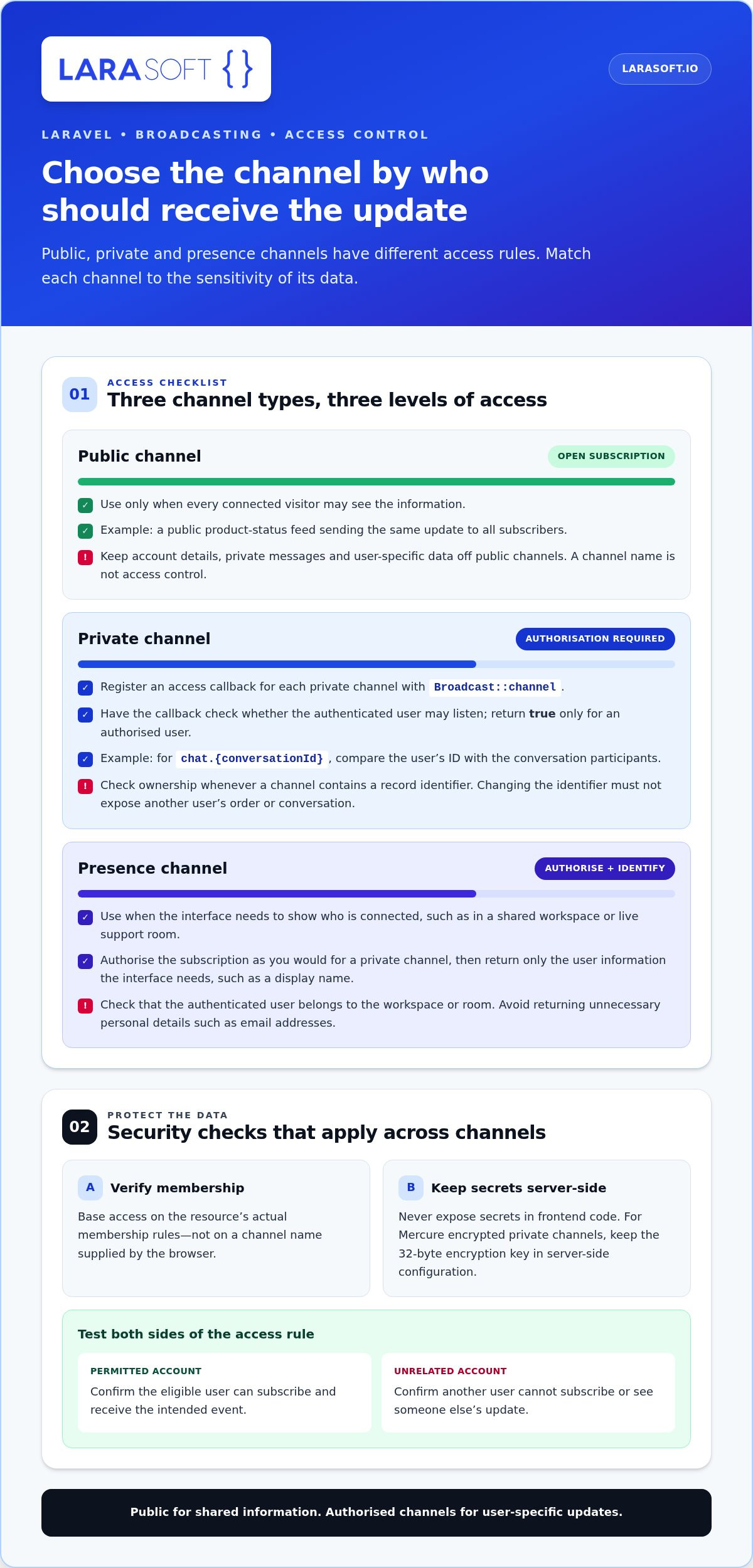
Choose a channel type according to who should receive each update. Public channels require no user authorisation; Laravel must verify access to private and presence channels before accepting a subscription.
Broadcast::channel. Laravel calls it when a user requests access, and the callback should return whether that user may listen. For a chat channel named chat.{conversationId}, compare the authenticated user’s ID with the conversation’s participants. Return true only for a member; reject other requests.Apply the same ownership check whenever a channel includes a record identifier. Changing an identifier in a subscription request must not let a user access someone else’s order or conversation. Keep authorisation rules aligned with the resource’s actual membership logic, then test both permitted and denied access using separate accounts.
Presence data can be useful in a shared workspace or live support room. Make sure the callback checks that the authenticated user belongs to that workspace or room. A successful response should identify an eligible participant, not grant access based on a channel name supplied by the browser.
Test access as part of the feature, not just the connection. Check that a permitted user receives the intended event, while an unrelated account cannot subscribe or see another user’s update. If channel rules cross application boundaries, a review of channel access design can help keep authorisation aligned with the data model.
Trace a missing message through its database record, event, queue, WebSocket connection and browser listener. Connection failures commonly involve mismatched hosts, rejected CORS origins or firewall rules that block WebSocket traffic.
Follow one message from the request to the client, checking each stage separately. Confirm the request validates its message field, the model saves the expected content, and the event uses the saved record. In the example chat API, a request without a message returns HTTP status 422; after a successful broadcast, the endpoint returns HTTP status 200.
Check that the migration creates the fields used by the message model and event. A renamed column or outdated database schema can cause the saved message to differ from the event payload. Then compare the event’s channel and broadcast name with the client’s subscription. Either mismatch can leave the database correct while connected users see nothing.
Pay close attention to transaction timing. An event dispatched before its message commits may reach a client before the record exists, or fail when a listener queries it. Implement ShouldDispatchAfterCommit alongside ShouldBroadcast to defer broadcasting until the database transaction commits. Check queue worker output too, because queued broadcasts depend on a worker processing the event.
Start with the browser’s network panel and console. Confirm the client connects to the intended WebSocket host, uses the correct secure or local protocol, and targets the same application as the broadcast event. If the connection never opens, investigate the endpoint, proxy or network configuration before the message-model logic.
To diagnose a CORS failure, compare the browser page’s origin with the allowed origins in Laravel’s configuration. The scheme, hostname and port must match the deployed frontend. CORS governs browser requests, while the WebSocket handshake also requires correct origin handling at the server or reverse proxy. Review the response and server logs to distinguish a rejected origin from an unreachable endpoint.
Check firewall and proxy rules for WebSocket traffic between the browser, Nginx and Reverb. Confirm that the route forwards upgrade headers and reaches the configured server and port. If connections work locally but fail after deployment, compare environment settings and network paths. Keep a test subscription open while sending a message, then check browser events, application logs and queue output in sequence.
Finally, inspect the payload received by the client. If the connection stays open but the interface does not change, verify the event name, channel subscription and JavaScript handler. These checks help distinguish transport failures from application logic, rather than treating every missed update as a server outage.
Use Laravel Echo in the browser to subscribe to broadcast channels and handle incoming events. Match Echo’s connection settings to Laravel Reverb, then test each subscription with a real event from your application.
Match the host and protocol to the endpoint used by your running Reverb server. A local development setup can use a local host, while a deployed application needs its configured public endpoint. If Echo points to a different host or protocol, the browser may not establish the WebSocket connection.
For example, a chat interface can subscribe to private('chat.42') and listen for MessageSent. The channel name, event name and authorisation rules must match Laravel’s server-side definitions. If the event uses a custom broadcast name, make Echo listen for that exact name rather than the PHP class name.
Handle the event payload explicitly. For a MessageSent event, read the message identifier and content, then update the relevant conversation view. Don’t assume the payload contains a full model: expose only the fields the client needs and make the interface handle missing or unexpected values.
Use Echo’s private-channel whisper events for client-side events that shouldn’t be persisted as server broadcasts, such as a typing indicator. For durable chat messages, broadcast a Laravel event instead. This keeps transient interface signals separate from saved application data.
Start with the user action that needs an immediate update, then choose a broadcast pattern suited to its importance and traffic. For a Laravel real-time application with WebSockets, decide whether each event should be queued or delivered immediately.
In a separate comparison for 80 concurrent users, polling generates approximately 1,600 HTTP requests per minute. WebSockets with Reverb generate approximately zero HTTP requests per minute in that comparison. Polling can also delay a chat message by up to 3 seconds. Use these figures to assess the request pattern, then test the feature against your own user activity.
OrderStatusChanged when an order moves to dispatch, including only the fields the interface needs. Implement Laravel’s ShouldBroadcast interface when the event should be queued. Queue workers can process broadcasts while the application responds to the original request.Use ShouldBroadcastNow for immediate broadcasting when an event must be sent synchronously. This can suit a small, time-sensitive update, but keeps broadcasting within the request path. Choose this behaviour deliberately instead of making every event immediate.
php artisan make:channel when a feature needs dedicated channel logic. Use php artisan channel:list to inspect registered channels and confirm each event targets the intended channel. For private data, make channel authorisation reflect the relevant account or record membership.Then connect the user action to a complete flow: save the changed state, dispatch the event, process any queue, and update the subscribed interface. An example chat API returns HTTP status 200 after broadcasting a message. Test both the saved message and the receiving browser, since a successful response alone doesn’t prove the client updated.
As you shape a laravel real-time application with websockets, keep its event flow tied to the feature’s business purpose, not the novelty of live updates. To plan that architecture for a production Laravel application, plan your real-time Laravel feature with an experienced development team.
Larasoft can help turn a working Reverb setup into a maintainable Laravel application when event flows, channel permissions or frontend integration need careful engineering. Its Laravel Web Development supports bespoke application work, while Vue.js or React Frontend Development can connect the broadcast layer to a responsive interface.
Bring in development support when real-time features need to fit an existing codebase, serve several user roles or connect with a mobile experience. Larasoft also provides Native Mobile App Development to extend application workflows beyond the browser. A sound implementation starts with the required user experience, data boundaries and system architecture, then brings those elements together in a coherent build.
Contact Larasoft to discuss your Laravel real-time application, or visit larasoft.io.
A real-time feature should support how people use your product, not simply add another stream of events. Before expanding a Laravel real-time application with WebSockets, decide which user actions need an immediate response and how those updates should shape the wider product experience. This focus helps keep future features useful, coherent and aligned with your application’s architecture.
For teams moving from a working prototype to a production-ready experience, the next step may be aligning Laravel’s event flow with the frontend. Larasoft offers Laravel Web Development alongside Vue.js and React Frontend Development, bringing the application and interface together around your requirements.
Discuss your Laravel project with Larasoft and explore how the next stage of your application can take shape. A considered technical foundation gives your team room to build with purpose.
Build the feature by connecting a Laravel event to a browser or app listener through a broadcasting server. First define the user action that should trigger an update, such as a support ticket changing status. Then persist the change, dispatch the event and update the relevant interface when it arrives. A small proof of concept can confirm the event payload and user experience before you extend the pattern to other features.
Install broadcasting with Reverb, configure its application credentials and start the server with php artisan reverb:start. Set the client connection values to match Laravel’s Reverb settings, then send a test event to a subscribed browser. For deployment, keep secrets in server-side environment configuration and use the public application key in the client. Check that development and production builds use the correct host and protocol.
Define channel authorisation rules around authenticated users and the records they may access. Test the rule with an eligible account and an unrelated account, then confirm the browser receives the expected authorisation response. For presence channels, return only the user details the interface needs to show participants. Also test expired sessions and users who lose access, so stale browser tabs do not retain assumptions about channel membership.
Configure Laravel’s queue connection, run a worker and dispatch broadcast events through the queue when request speed matters. Redis can serve as the queue backend when configured for the application, but it is not required for every broadcasting setup. Keep the worker’s environment aligned with Laravel’s broadcasting credentials. During testing, confirm that a queued event is processed and worker failures appear in application logs.
You can run the WebSocket server on infrastructure you manage, or use a managed WebSocket cluster when that better fits your operations model. Plan for a reachable WebSocket endpoint, suitable process management and network routing from your application and frontend. The right hosting approach depends on expected connection patterns, deployment skills and how much server operation your team wants to own.
Deploy Reverb as a persistent process, separate from ordinary web requests, and ensure it restarts cleanly after failures. Keep broadcast credentials consistent across application instances, and monitor connection health, queue processing and event errors together. As traffic grows, assess whether connection distribution and shared application state need changes. Test deployments with active browser clients, since a healthy web response alone does not show whether WebSocket connections remain available.
Laravel Reverb vs Pusher vs Soketi: features, pricing, and scaling
Laravel supports Reverb and Pusher Channels as broadcasting server options.
Here’s what we've been up to recently.
Certified Quality. Great Prices