Custom Manufacturing ERP Software: A 2026 Buyer’s Guide

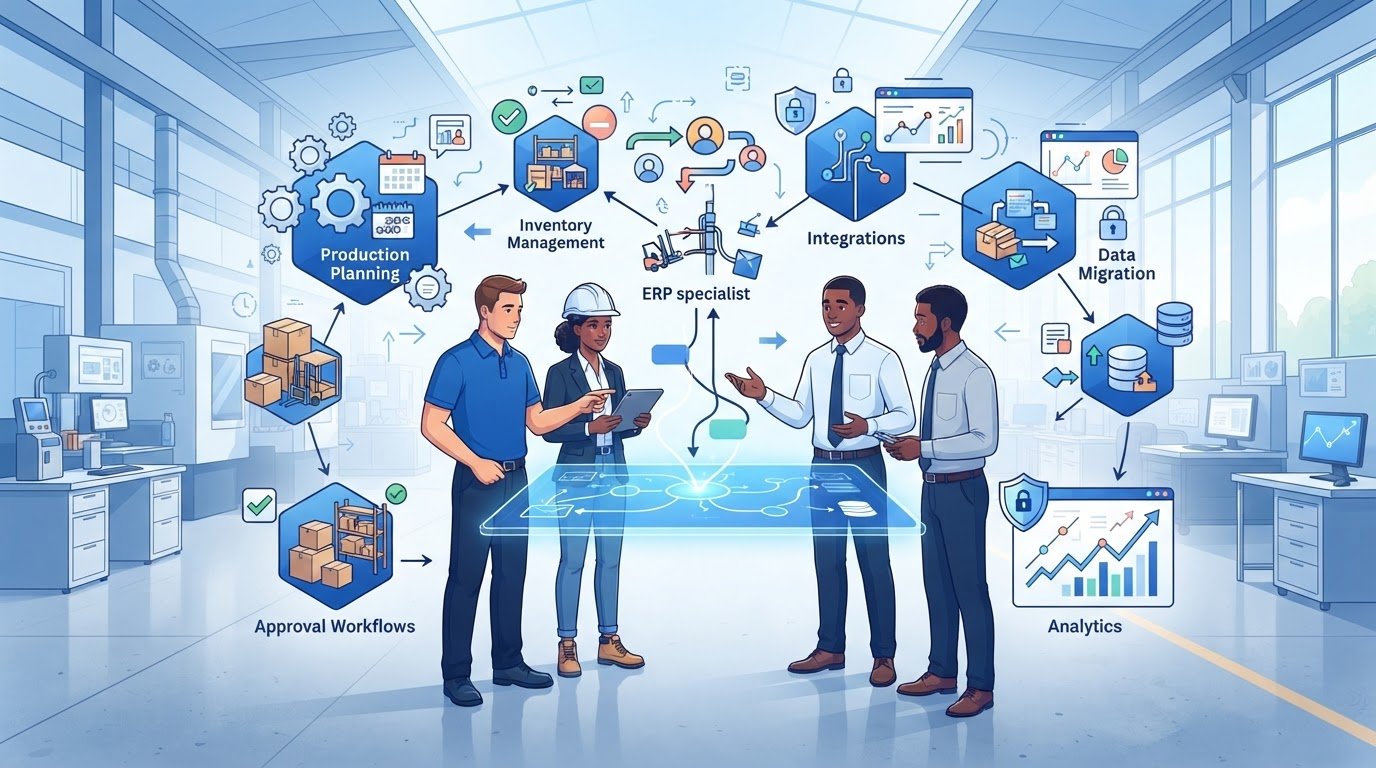
What if the best answer to your manufacturing ERP challenge isn’t custom manufacturing ERP software? A system that looks like a perfect fit can bring substantial build, integration and maintenance responsibilities. An off-the-shelf platform, meanwhile, may force production teams to work around processes that matter. The right decision starts with how your operation runs, not how many features a vendor can demonstrate.
If you’re weighing packaged software against a bespoke build, it’s reasonable to be cautious. Unclear requirements, disconnected systems and poorly scoped implementation work can create avoidable complexity. Before comparing vendors or development options, define the workflows, approval rules and operational visibility your business actually needs.
This 2026 buyer’s guide will help you assess those requirements, compare buy, build and hybrid approaches, and examine integrations, data migration, delivery risks and long-term ownership. You’ll learn where configuration may be enough, when a custom application or API could address a validated gap, and what to clarify about maintainability and partner responsibilities before committing. The goal is a proportionate decision that supports your production processes without adding complexity you don’t need.
Manufacturing ERP is connected software that coordinates operational and business information across the workflows a manufacturer chooses to manage. Depending on the operation, that may include orders, production planning, purchasing, inventory, quality records and finance. There’s no universal module list: a make-to-order workshop and a process manufacturer may need different workflows, controls and levels of shop-floor detail.
The key is continuity of information. A confirmed order should inform demand and planning; planned work should connect to materials and stock; completed production should support dispatch and invoicing. Consider custom manufacturing ERP software only after identifying where existing systems fail to support that flow. A document-processing tool can capture information from invoices, orders or other paperwork and pass selected records into an ERP, but it doesn’t, by itself, coordinate production, inventory or planning.
Trace a typical order from quotation and demand through production, dispatch and invoicing. Check how each stage uses shared records: supplier details support purchasing, material requirements inform replenishment, stock movements affect availability, and work orders define what needs to be made. Then identify who updates each record, when it’s updated and which system is the source of truth.
Separate shop-floor execution from higher-level planning and reporting. Operators may need to record work progress, quantities or quality checks, while planners need visibility of capacity, demand and material availability. The system should connect the information without assuming every team needs the same screens or level of detail.
MRP, or materials requirements planning, focuses on calculating what materials are needed and when, based on factors such as demand, stock and production plans. Its scope varies by implementation. Manufacturing Resource Planning expanded this planning concept, and Manufacturing Resource Planning (MRP II) provides useful historical context for how planning developed towards broader ERP systems.
MES, or manufacturing execution system, generally focuses on production activity and visibility on the shop floor, such as work progress and production records. ERP and MES capabilities can overlap, so assess the actual functions rather than relying on product labels.
IDP, or intelligent document processing, captures and extracts information from documents so selected data can be checked and transferred into other systems. It can support an ERP workflow, for example by processing supplier paperwork, but it isn’t a substitute for the ERP’s broader coordination of business and manufacturing information. Define the boundary: which system owns each record, and which tool passes information between them?
Start with the work your teams need the system to support, not a long list of features. A clear discovery process helps distinguish genuine operational needs from preferences and gives vendors or development partners a consistent basis for assessing fit. Connect each requirement to strategic goals and specific business outcomes, such as reducing repeated data entry or improving visibility of production status.
Describe how routings, work orders and stock movements work in practice, including substitutions, shortages, rework and other exceptions. Capture users, decision points, data owners, transaction volumes and reporting needs. A process that looks straightforward in a meeting may involve extra checks on the shop floor or adjustments by planners. Validate the map with the people who perform the work, not only those who oversee it.
Prioritise workflows that affect production continuity, inventory accuracy or recurring administrative effort. Record traceability, audit, regulatory and reporting needs for specialist verification against your products and obligations. Avoid committing to speculative automation before process ownership and data quality are understood. A phased scope can keep the first release focused while leaving a clear route for later improvements.
For each requirement, record the user role, permissions, approvals, data entities and exception paths. List required integrations, reporting outputs and migration sources, then define acceptance criteria that show how the requirement will be tested. Name a stakeholder who can confirm whether it’s met, and link it to an outcome you can measure. For example, track how often a team re-enters the same order information before and after a change, rather than relying on a broad promise of efficiency.
This document can reveal whether a packaged system, configuration or bespoke component is the proportionate route. If validated gaps point to custom development, review a potential partner’s bespoke software and API integration capabilities alongside its delivery approach and maintenance plans. Don’t treat general technical capability as proof of manufacturing experience; ask for relevant evidence.
Compare options against requirements you’ve validated, not an assumption that a tailored system must fit better. Assess existing manufacturing ERP products first. If a product covers your essential workflows with limited adaptation, building a replacement may add responsibility without solving a meaningful problem. If gaps remain, check whether configuration, an extension or an API can address them before considering a full bespoke application.
| Approach | Process fit | Integration flexibility | Implementation responsibility | Ownership and maintainability |
|---|---|---|---|---|
| Packaged ERP | Standard workflows; fit depends on product and configuration limits. | Uses the integrations supported by the vendor or its ecosystem. | Shared between your organisation, the vendor and any appointed implementation partner. Confirm responsibilities. | Vendor controls the product roadmap and upgrades; check licensing, data access and ongoing dependencies. |
| Configured or extended ERP | Adapts an existing system to selected processes, within its technical limits. | Can connect to other systems, but extensions may affect upgrade paths. | Requires clear coordination between internal owners, the ERP provider and technical partners. | Document customisations and dependencies so they can be reviewed and maintained over time. |
| Bespoke application development | Can address validated workflows that existing products don’t support proportionately. | Can be designed around defined interfaces, subject to integration feasibility. | Your organisation takes a more direct role in defining scope, governance, testing and delivery decisions. | You must plan for code ownership, maintenance, documentation and future changes. |
Packaged software may be the sensible choice when its standard workflows meet operational needs without extensive adaptation. Before selecting a product, investigate vendor support arrangements, the roadmap, configuration limits and how much your operation would depend on its ecosystem. Confirm licensing terms, data access, integration options and upgrade processes in writing. A strong product fit can reduce the need to own a bespoke codebase.
Consider tailoring when a material process difference creates a persistent gap that available products or proportionate extensions can’t resolve. An API or focused application may bridge that gap while leaving the core ERP in place. Custom manufacturing ERP software isn’t automatically cheaper, faster or more suitable. Bespoke delivery needs a defined scope, decision-making governance and a realistic ownership plan for maintenance and change.
Before commissioning a system from scratch, test the business case against the full delivery and ownership responsibilities. Specify which outcomes justify the added work, who will approve changes, and how the application will be maintained. If those answers are unclear, continue assessing packaged products and smaller extensions first.
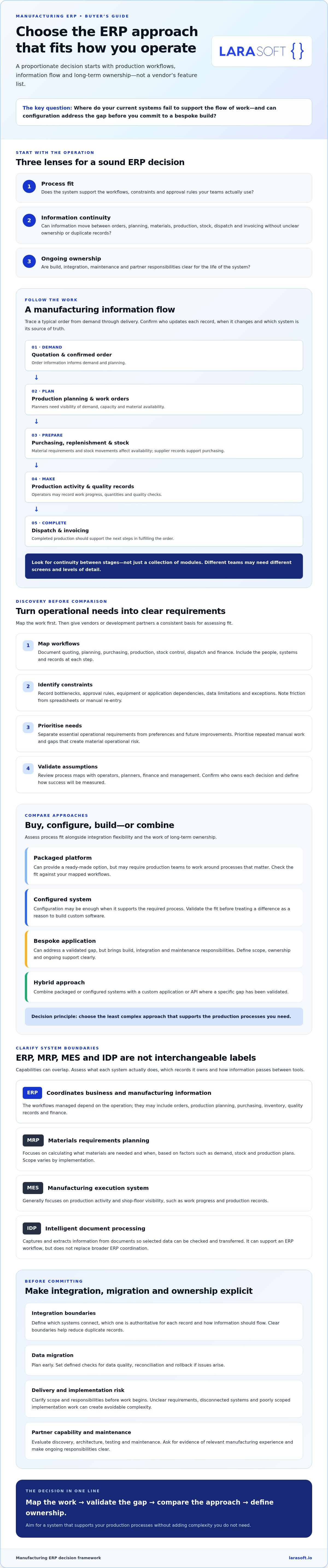
Integration and migration decisions affect whether an ERP can become a reliable source of operational information. Before development or configuration begins, agree which system owns each record and where data should be authoritative. For example, if finance owns supplier payment details while the ERP tracks purchasing activity, define how those records stay aligned and which system takes precedence when information conflicts. This boundary is essential when assessing custom manufacturing ERP software or extending an existing platform.
List every system in scope, including finance, ecommerce, warehouse, supplier, production and reporting applications. For each connection, document the available API or data format, what information moves, how often it synchronises, and what happens if a transfer fails. Name the person or team responsible for monitoring errors and resolving them. Ask whether each integration is native, configured, custom-built or dependent on another supplier, and confirm those details with the responsible parties.
Profile source data before agreeing a migration plan. Identify duplicate customer, supplier or stock records; decide who owns cleansing and mapping; and set acceptance rules for migrated information. Test with representative scenarios, including exceptions such as part-completed work or records that don’t match. Reconcile results against source systems so teams can spot omissions or mismatches before release.
Plan delivery around controlled testing and clear decisions, not just a target date. Consider phased releases where appropriate, user training, contingency arrangements and rollback steps. Set explicit go-live criteria, such as successful checks for priority workflows and agreed data reconciliation. Treat delivery estimates as project-specific: confirm assumptions, dependencies and exclusions with the supplier rather than relying on a generic timeline.
Ask how user roles and permissions are managed, what audit records are available, and how backups and incident processes are handled. Clarify hosting, data handling and retention arrangements, then have qualified advisers check which obligations apply to your organisation and products. Don’t assume a supplier’s standard approach covers your requirements.
Document who owns the system, who can access its source code and documentation, and which external services or suppliers it depends on. Agree how data can be retrieved and what happens if the relationship ends. These details matter for packaged systems and bespoke work alike. To assess a defined connection between systems, explore API integration options as part of your technical evaluation.
The right partner should make the decision clearer, not steer you towards a predetermined build. Use a consistent checklist to compare ERP vendors, implementation partners and software developers. Ask each to explain how they’ll work with your team, what they’re responsible for and how the solution will remain maintainable after launch.
Ask for relevant evidence and references, particularly for integrations, data migration and long-term maintainability. General software capability doesn’t prove manufacturing-sector experience. If a partner claims that experience, request examples that match your production model and ask what the partner delivered. Clarify dependencies on other suppliers, access to documentation or source code, and how unresolved issues will be handled.
Bring a validated process map, prioritised requirements, a list of existing systems and known constraints. That gives a technical partner a practical basis to assess whether an API integration, targeted application or ERP extension could solve the problem. Consider bespoke development when a confirmed gap justifies the delivery and ownership responsibilities, not simply because a workflow is unusual.
Larasoft develops bespoke applications and provides API integration, but it doesn’t sell packaged ERP products or managed IT infrastructure. For guidance on assessing a Laravel development partner, see the Laravel development agency guide. If your requirements support a bespoke component, use that framework to prepare a focused discussion around the validated need.
Before replacing a legacy system, assess its condition, dependencies, data access and operational risks. Incremental modernisation may address a specific limitation while avoiding the disruption of a full replacement. The right approach depends on the system and the business case. Review legacy code modernisation guidance if this is part of your evaluation.
A decision about custom manufacturing ERP software should follow evidence: a clear process gap, a proportionate technical option and a credible plan for ownership. Start with the requirement you’ve validated, then compare solutions against it.
A sound ERP decision starts with validated workflows, not a preference for building or buying. Define operational requirements first, then compare packaged systems, configuration and bespoke development against process fit, integration needs and long-term ownership. Clear data responsibilities, migration checks and delivery criteria help turn that choice into a manageable plan.
Custom manufacturing ERP software may be appropriate when a material, validated workflow gap can’t be addressed proportionately with an existing product or targeted extension. Bespoke development isn’t the default answer; it’s one option to assess against the responsibilities it brings.
Larasoft specialises in bespoke Laravel web applications and modern frontend development, with services including API integration, software maintenance and legacy code modernisation. If you’ve identified a specific software requirement, discuss a bespoke software requirement with Larasoft and explore whether a focused application or integration is a suitable next step.
With clear requirements and the right technical approach, you can move forward with greater confidence and build a foundation that supports your operation over time.
Custom manufacturing ERP software is a business system designed or adapted around a manufacturer’s specific workflows, data and integrations. It may connect purchasing, inventory, production, orders and reporting, but its scope depends on the organisation. Distinguish a bespoke system, built for particular requirements, from a configurable packaged ERP. Before committing, verify which processes the proposed solution will support and how those capabilities will work in practice.
No, custom ERP software isn’t automatically better. Packaged ERP may be the stronger choice if its standard workflows meet operational needs and its support model is suitable. Custom development is worth assessing when important requirements can’t be addressed proportionately through configuration or integration. Compare process fit, delivery risks, ownership, upgrade responsibilities and ongoing support. Base the decision on validated needs, not an assumption that bespoke software is inherently more suitable.
There’s no reliable universal price for custom manufacturing ERP software because scope, integrations, data migration, security requirements, testing and ongoing support all affect investment. Ask suppliers to separate discovery, implementation, third-party dependencies and maintenance in their proposals. Compare estimates against the same prioritised requirements and delivery assumptions. Treat precise figures provided before discovery as provisional, and check that proposals cover comparable work before using them to assess value.
Integration may be possible, but it depends on each system’s interfaces, permissions, data model and supplier constraints. First, establish which system owns each important record and how updates, failures and reconciliation will be handled. Ask whether a proposed connection uses an existing API, a configured connector or custom development. Confirm compatibility with the relevant software vendors before treating an integration as available or guaranteed.
Implementation time depends on the requirements, system complexity, data condition, integrations, stakeholder availability and whether delivery can be phased. A responsible plan follows discovery and technical validation rather than relying on a generic duration. Ask for milestones covering dependencies, migration, testing and acceptance. Treat any timeline as an estimate tied to documented scope and assumptions, and clarify how changes or delays could affect the plan.
Start with the workflows your organisation needs to manage, rather than assuming every ERP requires the same features. Areas to assess can include production planning, work orders, inventory, purchasing, order management, quality records, reporting and finance integrations. The right scope depends on your manufacturing model and business needs. Identify essential capabilities, user roles, exceptions and data flows, then verify that each candidate system supports them in practice.
Begin by listing data sources, owners, formats, duplicates and known quality issues. Decide which records should move, how fields map and what needs cleansing or reconciliation. Test the migration with representative data, then compare results against source systems before release. Include backup and rollback plans, user validation and sign-off. The migration approach should reflect the systems involved and the operational risks of missing or inaccurate records.
Here’s what we've been up to recently.
Certified Quality. Great Prices